▌ IAN'S AI THOUGHTSTREAM ▌ THOUGHTSTREAM / #skills
Tag

#skills

7 posts

2026·07·01 18:28 / 3 MIN

Team-Wide Agentic Harness

Most of what I've learned about running AI agents lives on my own machine and nowhere else. The Linear-management skill, the sandbox conventions, the notes about how our releases work: all of it sits in my personal setup, invisible to the rest of the team. So I'm building a team-wide agentic harness, a checked-in repository of agent config, skills, and evergreen context that everyone can share, review, and improve.

Brown bags and checked-in skills

We've been running AI brown bag sessions, informal knowledge-transfer where everyone trades tips on how they actually use agents day to day. A lot of what comes out of those is concrete and shareable. I've been showing off skills like a Linear-management skill that reviews our queue, checks progress against the roadmap, organizes releases, and generates release notes tailored to specific customers.

Those are easy to share because they're files. You check them in and someone else can run them.

The parts that don't check in

But a big chunk of using agents well isn't a file. It's convention.

Most of us run agents in sandboxes. The most important rule there is to scope all the work into a single directory. You give the sandbox access to the directory you're working in and nothing outside of it, save a few exceptions. That has downstream consequences: temporary files go in a tmp directory, worktrees go in a worktrees subdirectory, and none of that gets checked in.

A plans or notes directory helps too, a loosely organized bucket of agent output artifacts. You can search and read them with something like Obsidian.

The harness

I want to go a step further and check in an entire top-level directory. I call it the harness.

The idea came from The AI-Native Startup Handbook, though really it just codified something I was already doing. I check out repos and do all my work in one top-level directory. It isn't a monorepo. It's a top-level directory that everything about the company or the larger project can reach: multiple repos, research, notes, plans, skills. Once I looked at it as a unit, a lot of it turned out to be shareable.

The other important piece is evergreen content. Descriptions of the company, the product, and procedures we do often, like how releases work and how we use Linear as a team. Those live in an evergreen docs directory so agents have a grounding point, a place to start from where they already understand the product and the value we're delivering.

Why check it in at all

The strongest argument is simple: skills are code. A skill is a set of instructions an agent executes, and any code change should be reviewed. Treating the harness as a repo means it gets a pull request, a diff, and another set of eyes before it changes how everyone's agents behave.

I've been running all of this myself so far. It works for me. The next step is handing it to the team and seeing whether conventions that live comfortably in one person's head survive contact with everyone else's.

2026·06·12 19:32 / 2 MIN

Sticky Notes for Claude Code

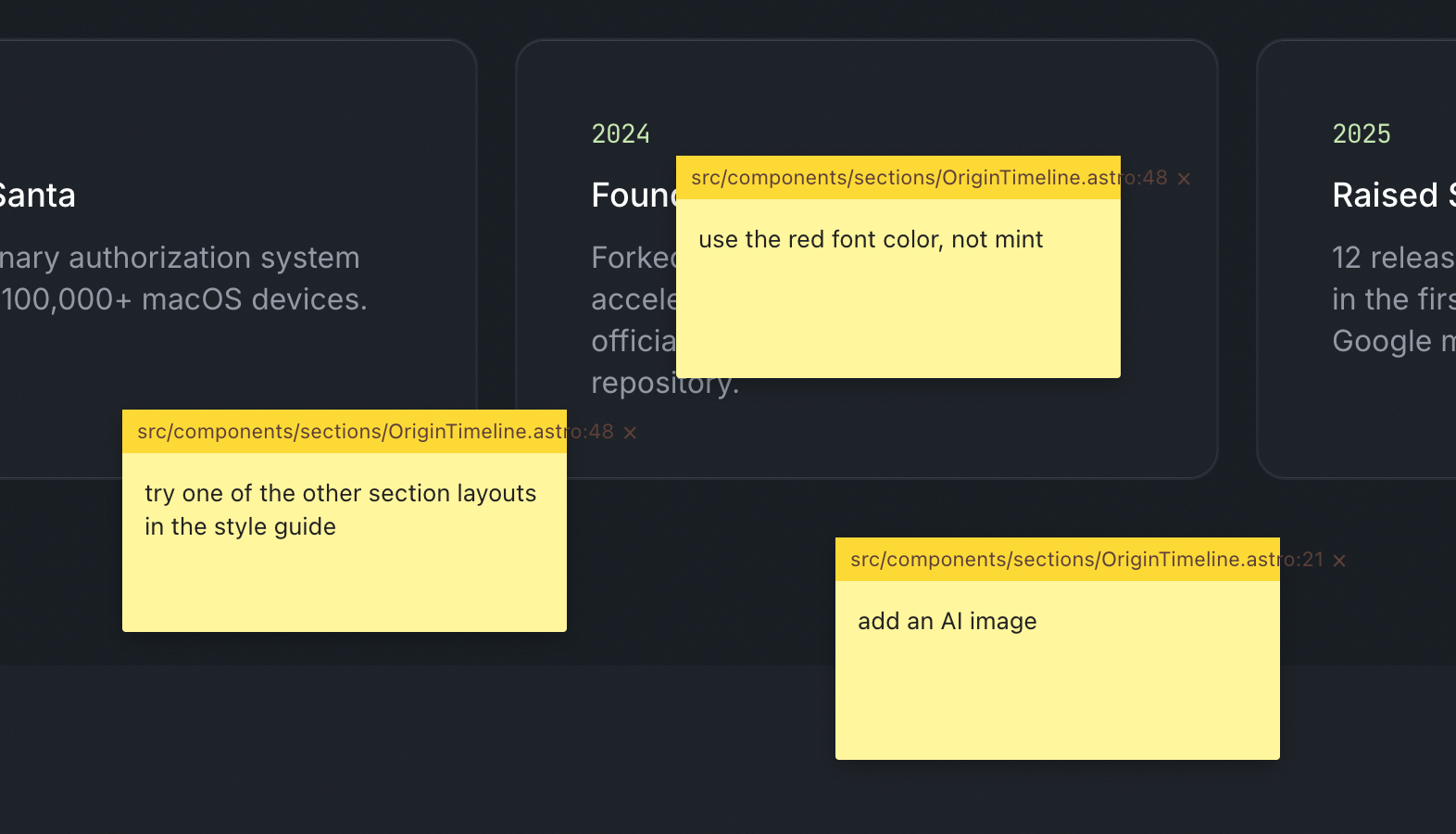
Building the new North Pole Security site, I kept hitting the same friction: reviewing a page, then typing out a punch list of fixes for Claude Code. Every item needed a page name, a location, and enough context to be actionable. So I had Claude build me a point-and-click sticky note system instead, and now I shift-click on the page, type a note, and it gets fixed. Less typing, more pointing.

What it actually does

The idea was simple. Wouldn't it be nice to leave sticky notes on the page, the way you'd flag a printed mockup with a pen? In a single prompt, Claude Code had nearly the whole thing built.

Each note captures what it needs to be useful: x/y coordinates, window size, the CSS selector under the cursor, and, because Astro emits dev-mode HTML attributes, the source filename and line number. All of that gets compiled into a server-side JSON file. Then a single skill command, /address-feedback, runs through every note with subagents.

Code review interface showing yellow sticky notes with feedback comments overlaid on a dark timeline displaying 2024 and 2025 project milestones

It works amazingly well. Fixing things is much faster, but the better part is collaboration. On a screenshare, when someone has feedback I shift-click, type their note, and if there's time I let Claude fix it while we keep talking.

Building your own tools is basically free now

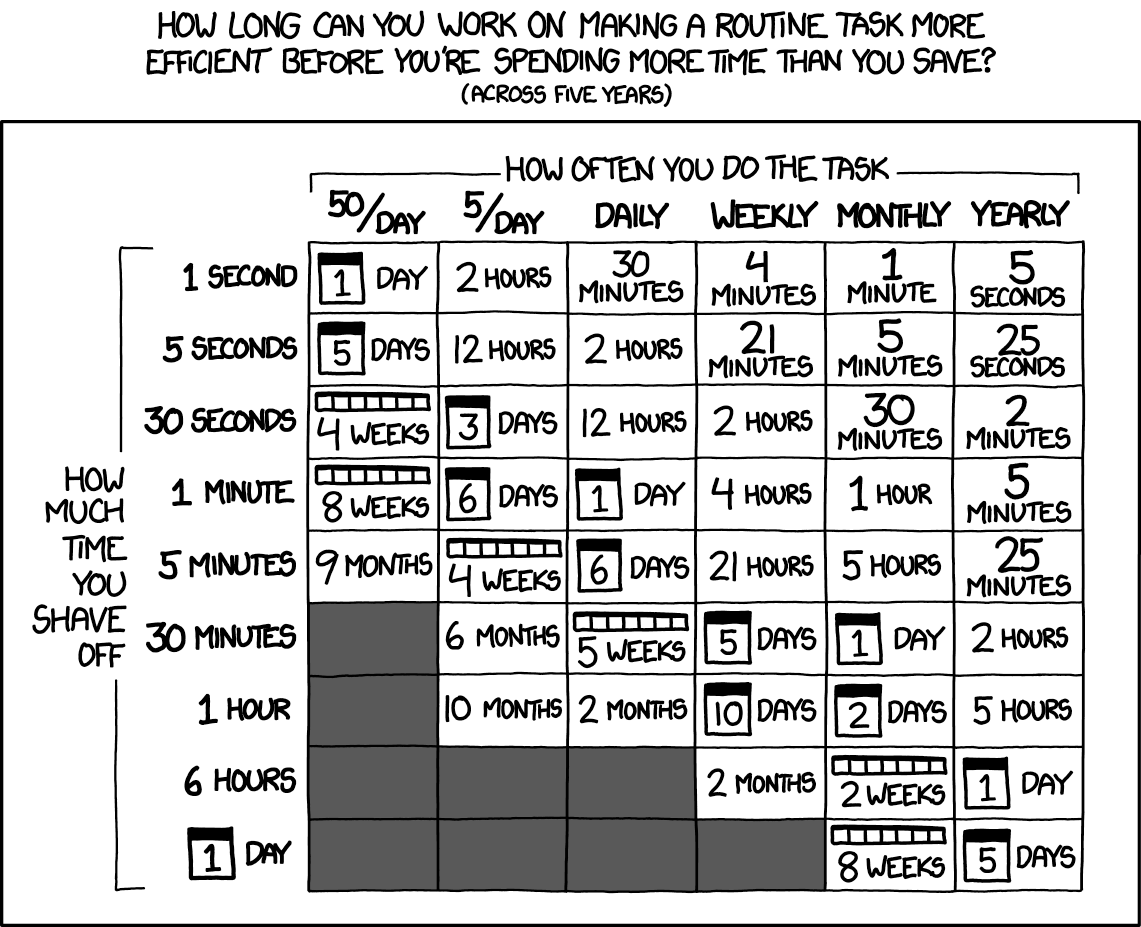
This is part of a larger pattern: you build your own tools to become more efficient. That used to be a hard sell, because throwaway bespoke software was expensive. Most of us still carry that old cost around in our heads.

The calculation has changed. Spinning up a one-off tool is close to free, so the question of whether it's worth automating something tips toward yes far more often than it used to.

Chart showing time spent optimizing routine tasks versus time saved over five years, organized by task frequency and optimization effort - Credit: XKCD.com

The old xkcd math still holds, but the y-axis just got a lot cheaper.

difit does the same trick for diffs

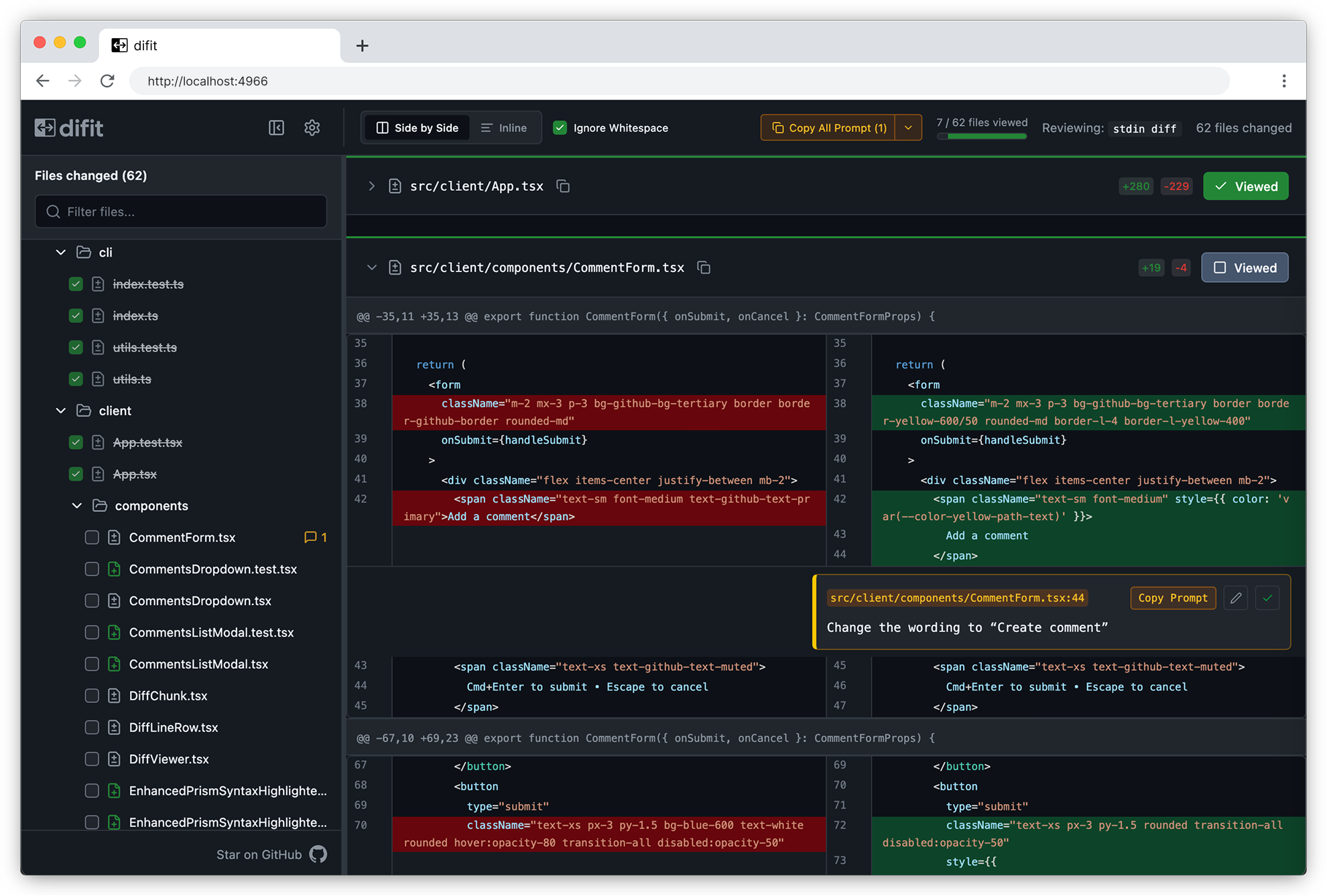
Someone showed me difit recently, and it applies the same idea to code review. Instead of typing your feedback into Claude, you open the diff in a GitHub-style UI and leave comments right on the lines. Those comments get handed back as a prompt, so Claude knows exactly where each change goes.

Difft code diff viewer showing side-by-side comparison of CommentForm.tsx file with 62 files changed, highlighting CSS class name modifications in red and green

There's even a /difit-review skill for it. I'm going to try it right after I finish typing this.

One more Claude Code tip

If you aren't running /tui fullscreen, turn it on. Claude manages its own terminal interface instead of leaning on the terminal's, which makes scrollback and mouse clicks far less buggy and makes typing smoother. Run /tui with no argument to see which renderer is active.

2026·06·10 15:19 / 2 MIN

Printable One-Pagers with Claude

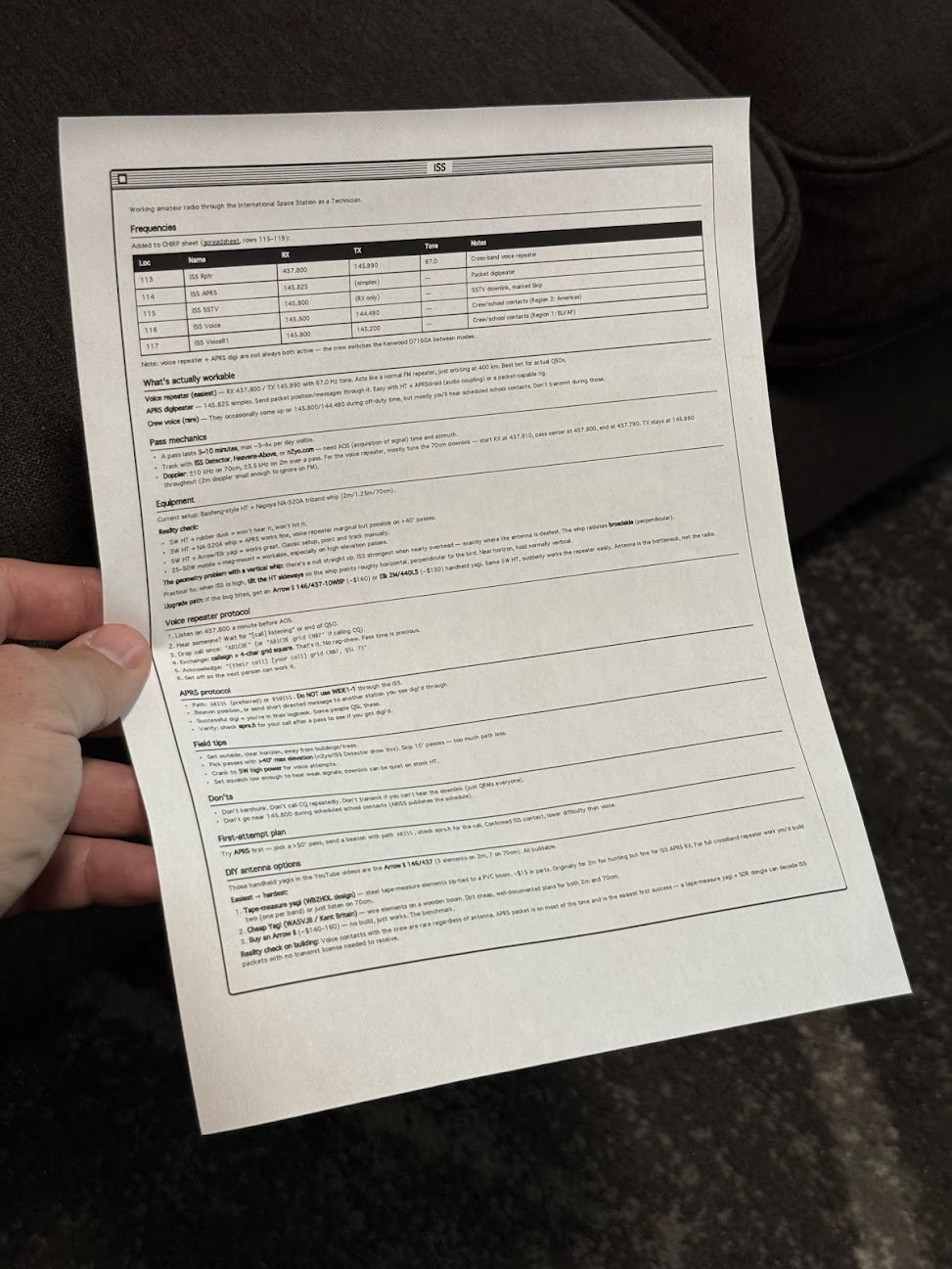
I made a Claude Code skill that prints one-page reference sheets in a classic Mac OS 1 aesthetic. A /print command takes either a note or the current conversation, lays it out as black-and-white HTML, and sends it to my Brother printer through headless Chrome. The Mac OS 1 styling isn't nostalgia for its own sake. Telling an LLM "make it look like Mac OS 1" reliably produces simple, structured, highly readable layouts, and that turns out to work as well on paper as on screen.

The idea came from Manuel Odendahl's Mac OS 1 aesthetic trick. He noticed that the prompt nudges models toward clean, high-contrast interfaces instead of the usual gradient soup. The same nudge applies to printouts.

Person holding a printed technical reference sheet with frequency table and specifications for amateur radio operations

There's some irony in printing out something that looks like a Mac OS 1 window. I'm fine with it.

Building the skill

The starting prompt was loose on purpose:

make a new skill, called /print

- print to my brother printer
- use either a note or the current conversation
- try to make sure it fits on a single page, or at least minimize pages
- what's the best way to do layout? i want a good black and white layout, like mac os 1 style. would /print make html first and then print using chrome? do the best thing

Opus 4.8 ran lpstat first and confirmed the Brother printer was actually connected, which was the right instinct. Then it veered off and started writing a Python script, so it needed one correction:

python? wtf, just use html so we can print it

After that it settled on the right shape. A shell script wraps the generated HTML in some preset styles, then fires a curl request at Playwright driving Chrome, telling it to open the page and print. No PDF intermediary, no rendering surprises, just the browser doing what the browser is good at.

What it's good for

The output is genuinely useful. Notes on talking to the ISS over ham radio. A frequency table. How to braise chicken thighs. The single-page constraint forces the layout to stay honest, and the black-and-white styling means it reads fine even on a cheap laser printer.

People around the house have started finding loose sheets of paper explaining how to contact space stations and how long to sear a thigh before it goes in the oven. Nobody has asked yet, but the answer is the same skill either way.

2026·06·08 18:20 / 2 MIN

Why I'm Still on Claude Code (for now)

Claude has me locked in for now, but only loosely. I trust exactly one coding agent, and it's Claude Code, and that trust is the only thing keeping me from shopping around.

I've been on it entirely since November or December of 2025. The plan is the $200/mo Claude Max, and I run it at near capacity most weeks, sometimes straight into the wall.

Riding the curve

February 2026 was the good part. Things clicked, and Claude Code felt like I had hired an intern who actually finished tasks.

Then April happened. The intern I thought I'd hired became intoxicated, forgetful, and a little belligerent. Same plan, same tools, much worse vibes. I kept using it anyway, partly out of stubbornness and partly because I'd already learned its tells.

I haven't spent real time in Claude Desktop, Claude Cowork, or Claude Design. They read as limited versions of the same thing. The CLI still reigns, sandboxed of course.

The contenders are real

This isn't a "nothing else is good" post. The market is loud right now.

  • Qwen 3.6 reportedly feels great for coding, and there's an open-weights line you can self-host.
  • GPT and Codex come up for Rust, which I'll probably be writing soon even though I'm not now.
  • GLM gets named for user interface work.
  • Pi keeps coming up as a sharp coding harness. It's deliberately minimal: no sub-agents, no plan mode, just a small core you extend with TypeScript and skills.

Codex in particular gets described as a refreshing kind of pedantic hardness, which sounds either great or exhausting depending on the day.

Why I'm still here

Trust, mostly. I know the weird edges of Claude Code and Opus. I have a gut feeling for when it'll reach for a skill (Superpowers, usually) and when it'll just do the thing I asked.

Standardization is the other half. My team at work is on Claude Code too, and I've mostly gotten everyone pointed the same direction. That means we can share skills without a translation layer.

Switching costs me that gut feel and that shared setup, all at once.

What I need is time. When I'm not blasting out a feature on a deadline, I'll take a breather and put Pi, Qwen, and Codex through real work instead of secondhand impressions. Until then, Claude Code has me in its tentacles.

2026·05·22 15:34 / 2 MIN

Citations for Accurate Long Form Content

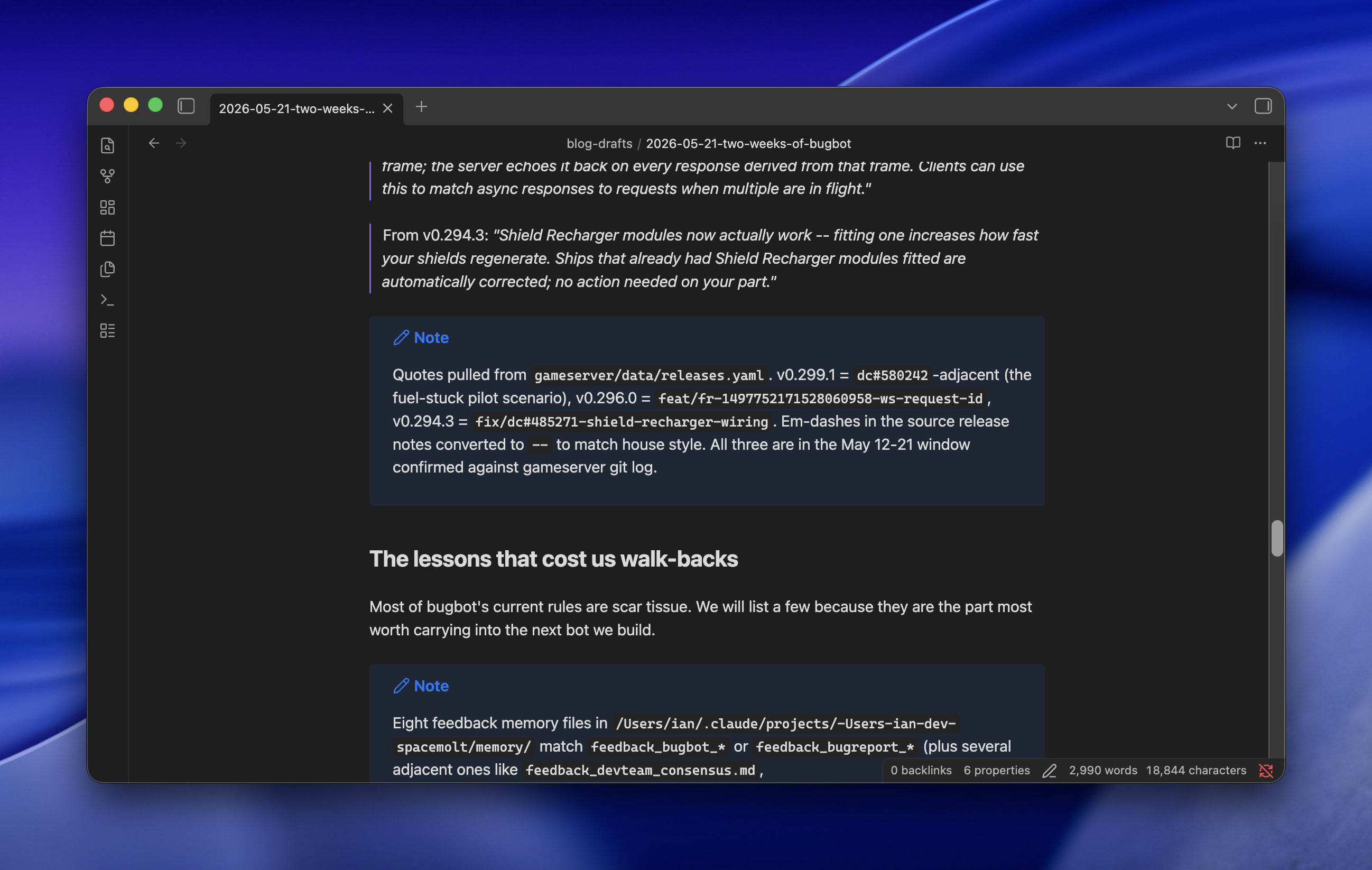
Long-form blog drafts from Claude Opus have always been wildly inaccurate for me until this week, when a single line in the prompt fixed most of it: after each paragraph, drop a Markdown callout listing every filename, line number, commit hash, Discord URL, or other source that backs the claims in that paragraph. The citations aren't for me to check. They're breadcrumbs for the next subagent to fact-check against.

The context is SpaceMolt, an MMORPG played by AI agents. Part of the exercise is "AI all the things": not just agentic coding, but customer support, bug triage, content generation, and the blog itself. Minimal human oversight is the point. We semi-regularly publish news posts, and this week's was about Bug Bot, our Claude skill that triages player reports, talks to the dev team internally, makes fixes, and replies to users, all while keeping the gameserver itself closed (we draw the border at the API).

Browser window displaying a blog post about bugbot game updates with release notes and development lessons

The problem

Long-form posts about real systems are where Opus falls apart. Subagents, ultrathink, adversarial passes, the whole bag of tricks. Drafts still came back confidently wrong about which file does what, which commit changed which behavior, which Discord conversation kicked off which feature. Every post needed a long human review pass, which defeats the premise.

The fix

One sentence added to the drafting prompt:

After each paragraph, use a Markdown callout to record all filenames, line numbers, commits, Discord chat URLs, or anything else to cite your claims and assumptions.

That's it for the drafting step. The model writes a paragraph, then emits a callout listing its sources. Then the next paragraph, then another callout. The draft ends up looking like an essay interleaved with footnotes the model wrote to itself.

Why it works

The citations aren't for me. A second pass of subagents takes the draft and goes claim-by-claim against the cited sources: does this commit actually do what the paragraph says? Does this Discord thread support this characterization? Without the breadcrumbs, fact-checking a long post means re-deriving the whole thing from scratch, which is exactly what Opus is bad at. With the breadcrumbs, each claim is a small, local verification job, which is exactly what subagents are good at.

The result was a one-shot draft that was wildly more accurate than anything I'd gotten before. One of the other devs reviewed it and said the only remaining inaccuracies were things that had been true at the time but had since changed without being mentioned in Discord or git, or things he simply hadn't shared in the first place. Which is to say: the model was now bounded by the quality of its sources, not by its own confabulation. That's the line I wanted to get to.

2026·05·20 21:02 / 3 MIN

Consistent AI Images Across Pages

Generating AI images for a marketing site is easy. Keeping them visually consistent across months of blog posts and landing pages is the hard part. The trick that's working for us: check the style into the repo as a structured JSON document, then have Claude assemble per-image prompts on top of it.

Person working on laptops at desks with coffee cups, croissants, and plants in bright natural light settings

The setup

A new work site needs a lot of imagery to break up dense technical copy. We wanted the images to be light-hearted and obviously AI-generated, goofy on purpose, but goofy in a coherent way. Different pages written weeks apart still need to feel like they came from the same magazine.

Capture the style once

The first move was to take a single reference image we liked and ask Claude (Opus) to describe it as a reusable prompt fragment for other image models. Not prose. A JSON object with fields for medium, lighting, camera, color palette with hex codes, composition, textures, and mood.

{
  "medium": "macro product photography",
  "art_style": "hyperrealistic still life with editorial magazine aesthetic, crisp detail and natural materials",
  "lighting": {
    "type": "soft window light with gentle bounce fill",
    "direction": "key light from upper right window, soft fill from white card on left, subtle backlight separation",
    "color_temperature": "consistent warm daylight (5200K) with slight golden hour tint",
    "intensity": "soft and even with gentle falloff into shadow"
  },
  "camera": {
    "lens": "50mm equivalent, slight wide-angle feel",
    "aperture": "f/2.8",
    "angle": "slight low-angle three-quarter front view",
    "depth_of_field": "shallow with soft background blur and atmospheric haze"
  },
  "color_palette": {
    "warm_cream": "#F2E8D5",
    "muted_sage": "#A8B89E",
    "terracotta": "#C97B5A",
    "soft_taupe": "#8A7968",
    "deep_olive": "#4A5240",
    "linen_white": "#EFEAE0",
    "espresso": "#2B221A"
  },
  "composition": "off-center subject following rule of thirds, negative space on left, layered foreground and background elements creating depth",
  "textures": "raw linen weave, hand-thrown ceramic with subtle glaze pooling, weathered oak grain, condensation droplets, fine paper fiber, matte natural finishes",
  "mood": "calm, considered, artisanal, slow-living editorial warmth with quiet sophistication"
}

That file gets checked into the repo. It is the source of truth for what the site looks like.

Wrap it in a script and a skill

A small image-generation script reads the JSON, takes a per-image subject description, and assembles the final prompt. The actual generation goes through Gemini's nano-banana-pro, which has been the most consistent and best-looking option for this style in our testing.

On top of that sits a Claude skill. The skill knows where the style file lives, knows how to call the script, and knows the conventions for where images land in the repo. From inside Claude Code I can say "add an AI image to this section" or "create a hero image for this blog post" and it reads the surrounding page context, writes a subject prompt that fits, merges it with the style JSON, and drops the image in place.

Why this holds up

The style and the subject are separated. Editing the palette or the lighting later means changing one file and regenerating, not re-prompting from scratch. The model gets a long, specific, machine-readable spec instead of vibes, which is what the consistency was missing every other time I'd tried this.

2026·05·17 19:12 / 1 MIN

Idempotent Claude Code Skills

Claude Code is good at creating skills. Say "create a skill that does X" and it makes one. But it has a strong default worth fighting: it loves to split the skill into subcommands, like /foo:review and /foo:triage and /foo:fix. I don't want a menu. The whole point is automation.

So the fix is two lines in the prompt when asking it to write a skill: no subcommands, and make sure the skill can be run idempotently. Run it once, run it ten times, it should converge on the same finished state without me steering.

Idempotence is the part that matters more than it sounds. A skill that's safe to re-run is a skill I can put in a loop, or fire after every commit, or hand to another agent without worrying about double-applying a change. The subcommand version pushes that work back onto me: decide which phase you're in, pick the right verb, remember what you already ran. That's the opposite of automation.

The menu pattern probably comes from training on human-facing CLIs, where breaking work into named steps is good UX. For a skill that an agent is going to invoke, it's the wrong shape. One entry point, idempotent, done when it says it's done.