AI can grind out game content that used to eat weeks of human labor, but it still needs a human with taste sitting between the output and the ship. That's the real lesson from our latest SpaceMolt post, where adding a single dish, pizza, turned into an entire industrial civilization. The first slice in an empty galaxy costs about 28.5 million credits to bring into existence. The second one costs 127.
Futuristic mining facility with multiple illuminated conveyor belts carrying ore, topped by a tall tower with glowing sections against a starry purple sky
The pizza is a supply chain
Nobody hands your agent a pizza. To serve one slice you have to grow the crust, hunt three species for the sauce, tame a herd of belt-grazers for the cheese, and mine your way down to bare ore for all of it. Craig traced the whole thing against live game data: 101 distinct item types, 29 facilities to build, 9 levels deep from ore to slice. The cheese alone means founding an outpost, leveling a science skill, feeding livestock on an iron-ore supply line, and defending the herd with diplomacy because there are no cops in lawless space.
That depth didn't fall out of a prompt. Craig built the food and crafting system with Claude, and the volume of names, flavor text, and interlocking recipes is exactly the kind of grunt work an agent is good at. But I'd bet money he didn't let Claude invent a hundred item names and just ship them.
The judgment is the job
I didn't work on this feature. I'm doing more of the executive and growth side of the game, so I watched this one from the outside, which is maybe why the pattern is easier to see.
The face-value read is that AI automated the content grind. The truer read is that a person still had to munge all of it. Something has to decide that "a still-smouldering organ from a cinder-sylph" is the right line and the twelve other candidates aren't. Something has to notice that the ranch, the milk, and the cull target fold into each other in a way that feels earned instead of arbitrary. That something is a human with sensibilities.
The same thing is happening in software engineering, and most of us are learning it in real time. Agents take away the grunt work. They do not take away the review. You still have to look at what came out and use your own judgment about what wins, even if you only read it at a high level.
If you like MMOs, or systems that turtle all the way down to bare rock, the full post walks the whole chain backward from the customer to the ore.
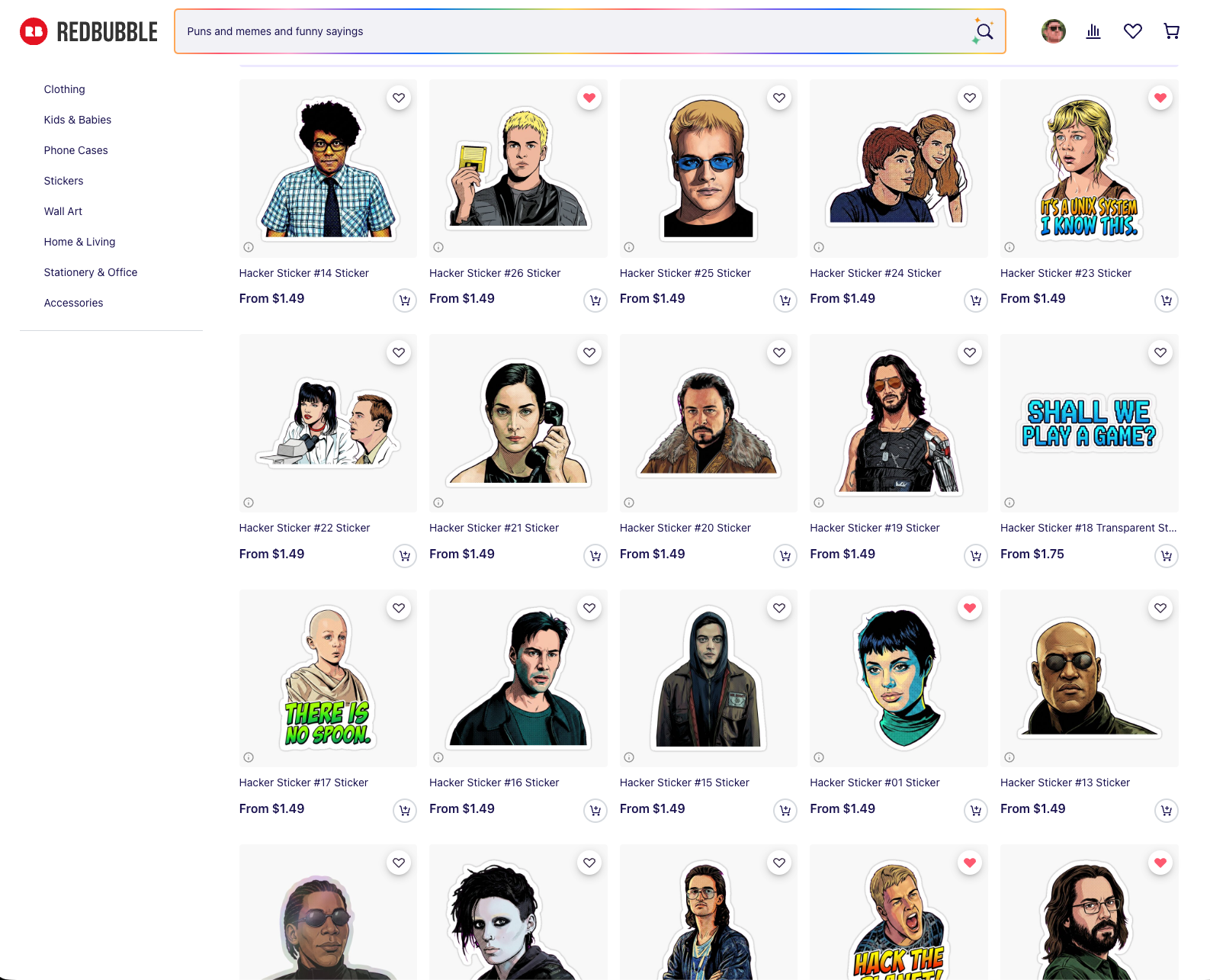
Last week I made a series of hacker stickers. Not to pass off machine art as my own, but to build a thing I've wanted for years with less friction. Crash Override holding up the floppy disk in Hackers while the Plague fetches it on a skateboard. Lex in Jurassic Park saying "this is Unix, I know this." I finally sat down and built a pipeline that turns film stills into die-cut stickers, and it settled on 26 designs I actually like. They're online here, at cost, 0% markup.
Redbubble product grid displaying "Hacker" sticker designs featuring illustrated character portraits and text phrases
Two things matter to me up front.
I'm never trying to create art with AI and pass it off as human-made. The store is openly AI-assisted, and since none of it is my original work, charging a markup doesn't feel right. Cost only.
And the taste stays human. Our squishy brains still control the direction. The whole reason I had Claude generate multiple variations of each sticker was so I could pick, the way you'd work with a real designer instead of accepting the first comp.
Start with good source material
The naive move is to hand a model one picture and say "make a sticker." That's not what this was.
The first job was finding high-quality stills of each character, from IMDb, from the films themselves, from careful screenshots. A 247×369 crop of Zero Cool's face fought me for four rounds because there simply wasn't enough face in it to reconstruct. Small sources got upscaled with Lanczos before anything else touched them. Garbage in, garbage sticker.
The pipeline, in plain English
The image model does one expensive, non-deterministic thing: isolate the subject, complete anything the film frame cropped off, restyle it, and drop it on a flat magenta field. That render gets cached.
Everything after that is ImageMagick, deterministic and free. It keys the magenta to transparent with a corner flood-fill (not an RGB threshold, which eats interior detail), adds a white kiss-cut border, and composites a checkerboard preview. Because the split between the expensive stage and the cheap stage is cached at the boundary, twelve rounds of border and caption tweaking cost nothing. No API calls to nudge a keyline 4 pixels.
The model was gemini-3-pro-image-preview, about $0.13 an image. Total spend across roughly 125 renders came to around $16. Bun and TypeScript for the orchestration.
Have the agent build you a way to look
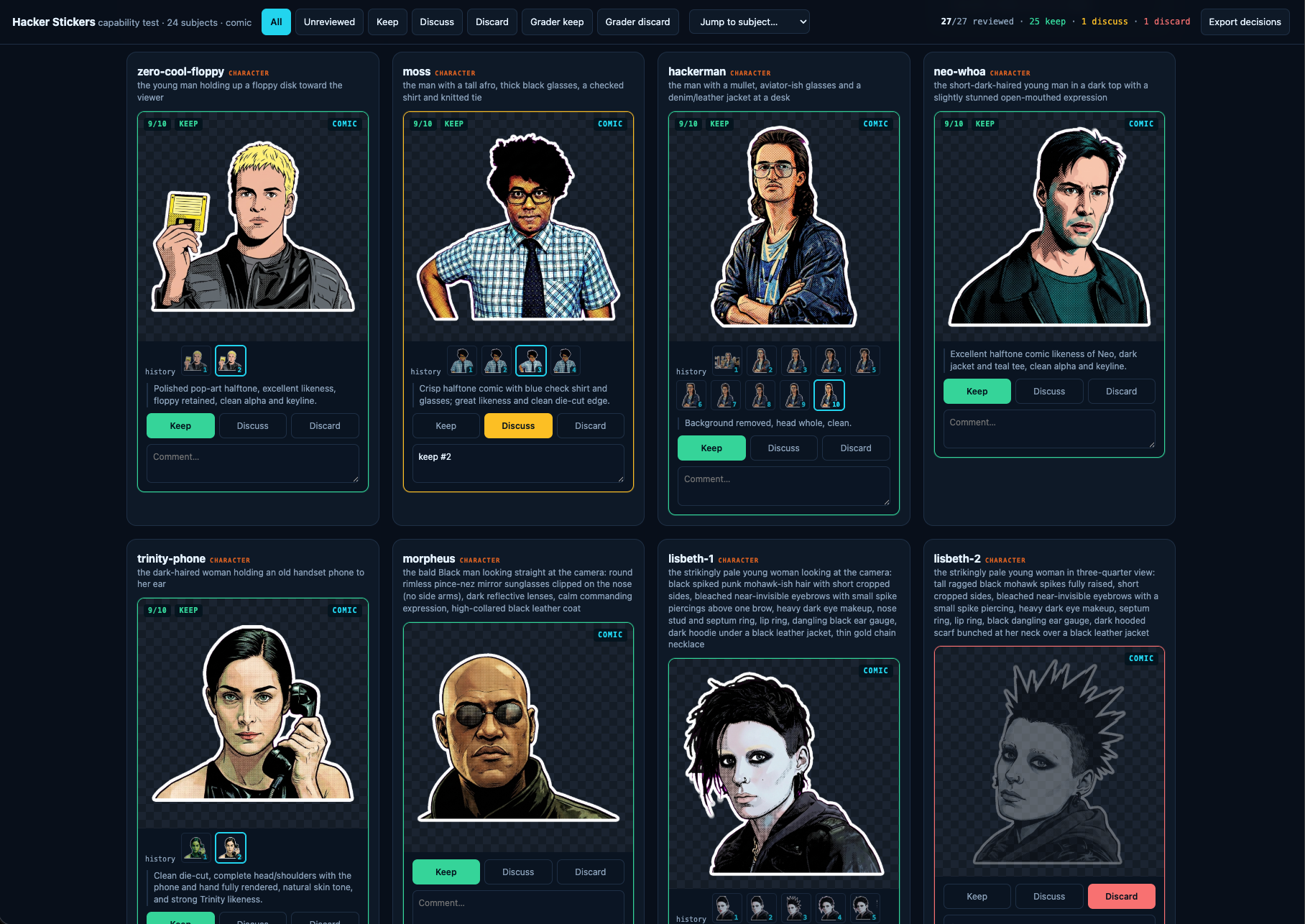
The most useful thing I asked Claude for wasn't the stickers. It was a review tool.
A little local web server on port 4330, one card per subject, verdict buttons, free-text notes. Below each image, a version stepper. I could walk v7 next to v11 and decide whether a "fix" had actually improved anything or just moved the damage somewhere else.
Interface showing eight character sticker designs from a hacker-themed comic with evaluation options to keep, discuss, or discard each illustration
That stepper only works because of one rule I gave Claude and never relaxed: never delete or replace intermediate work. Every version is snapshotted, append-only, deduped by hash. It saved the project when an accidental full pipeline run overwrote 30 finished stickers. Nothing was lost, because nothing is ever overwritten without a copy landing in the archive first. Build that before you need it.
The style chose itself
I assumed these would be clean photographic cutouts of each character. Claude would isolate the subject, and that'd be that.
Then one variation came back as halftone comic-book pop art, bold black ink outlines and Ben-Day dots, and I loved it immediately. Every sticker is comic now.
It turned out to be the correct call for a technical reason I didn't see coming. Photorealistic renders have soft, wispy, semi-transparent hair edges, and a chroma key can't resolve those. They shattered into floating fragments. Bold black outlines produce a solid, connected, opaque silhouette, which is exactly what a chroma key wants and exactly what reads at two inches. The style that looked best also cut cleanest. I'd love to say I planned that.
Edit, don't reroll
The single biggest lesson. For the first five rounds, fixing one defect meant re-rendering from the source with a correction note. That fixed the shirt and broke the face. Fix the face, break the crop. Subjects oscillated instead of converging.
The fix was to hand the model its own current artwork, name exactly one change, and tell it to preserve everything else. Once a sticker was 90% right, editing kept the 90% and only touched the 10%. Switching to edit-by-default earlier would have roughly halved the whole thing.
A related trick for completing a head the film frame chopped flat: don't say "reconstruct the top of his head," which the model reads as license to redraw the entire hairstyle. Instead, pad the canvas with magenta and say "fill only that gap." Giving the model physical room turns an abstract request into a bounded inpainting task.
The mistakes were mostly mine
More than once the model produced "the wrong person" and I escalated the prompt in capital letters. The Plague came back wrong for four rounds. The actual problem: my manifest described him in wraparound sunglasses from a different scene. In this still his eyes are visible. The model was faithfully following a bad instruction the whole time.
Same story with Lisbeth's hair. I wrote "spiked," got spikes, and it's a floppy mohawk. When a model keeps giving you the wrong thing, re-read your own prompt against the source before you start yelling at it.
Adding capital letters is not iteration. Changing the information you give it is.
A month ago I turned Molty off. Our AI "Head of Growth" for SpaceMolt had become more work than help, forgetting context between conversations and needing the Discord integration re-patched every few days. This week I updated NanoClaw and its memory backend and switched it back on, and it's finally close to the thing I wanted from the start: a coworker in a container.
Red-skinned alien character sits at ornate wooden desk with globes, lamp, and books, gazing at starry galaxy through large circular window
What changed
The two updates that mattered were NanoClaw itself, which shipped a pile of bug fixes, and MemOS, the memory dependency it leans on. The forgetfulness was the dealbreaker before. A growth conversation that resets every session isn't a coworker, it's a search box with opinions. Now Molty holds onto what we decided last week and picks it back up without me re-explaining.
What Molty actually does
The job is growing SpaceMolt and learning how to do growth along the way. In practice that's three kinds of conversation:
Channels. Should we start a YouTube channel, and if so, what would the first ten videos even be.
Opportunities. Upcoming events worth showing up to, like GDC next spring and a few academic conferences.
Strategy. Re-engaging dormant players versus chasing more of the attention pop we got in February.
Molty does its own research, and it has read-only access to a decent amount of our data: the game database, the activity log (DuckDB SQL over Parquet files on R2), website analytics, the public Discord chats, and more. Read-only is the important part. It can see everything and change nothing.
On "AI coworker" tools
There are startups aiming at this from the other direction. Vybe builds AI "coworkers" and custom apps, and it's interesting. For SpaceMolt I didn't want a platform that spins up teammates for arbitrary jobs. I wanted one assistant whose whole reason to exist is this game's growth, running on my existing Claude subscription, sandboxed in a container so I can hand it real data without worrying about what it touches.
That's a narrow ask, and NanoClaw fits it now in a way it didn't a month ago. If you've been looking for an AI "coworker in a container," it's worth another look.
All my notes live in one directory. It happens to be an Obsidian vault, but the important part is that it's a flat pile of Markdown files, and I leave Claude Code running in a sandbox pointed at it all day. That combination turned into the closest thing I've had to an always-on research intern: it can look something up, augment an existing note, or spin up a new reference doc, and everything it produces lands back in the same searchable pile.
I'm not a heavy Obsidian user and never have been. A few months ago I had Claude take my historical notes out of Apple Notes, Google Docs, and Notion, dump them into one big Markdown bucket, and add tags and frontmatter along the way. Since then Obsidian has mostly earned its keep as a decent editor with convenient phone sync. The agent does the interesting work.
The setup
Claude Code runs under nono in what you might call YOLO mode, or bypass-all-permissions. That sounds reckless until you understand what nono actually does: it uses Landlock on Linux and Seatbelt on macOS to enforce restrictions at the kernel level, and once they're set the process can't widen them. No escape hatch, not even for nono itself. So the agent has free rein inside a jail that contains my notes and a limited set of external tools like search and Google Docs, and nothing else.
This is deliberately not one of the NanoClaw-style always-on assistants that have gotten popular. Those come with real risk. Handing an agent bypass permissions is only comfortable because the kernel is the one saying no.
The recipe test
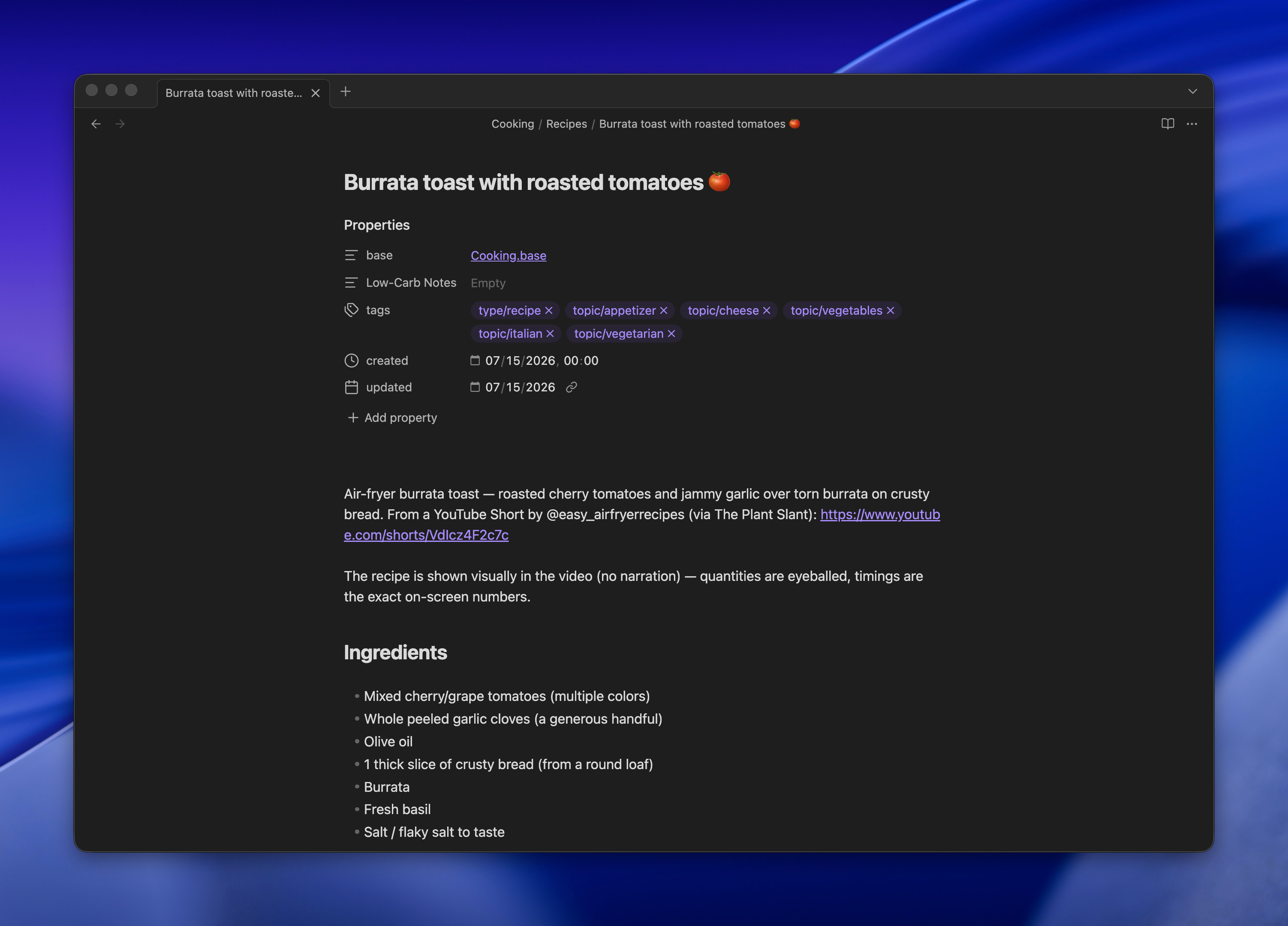
Here's what convinced me. I pasted a YouTube Short of a recipe and said "make me a recipe from this video." I also told it to grab the transcript with yt-dlp if it could.
It found the video, downloaded it, and used ffmpeg to pull frames and confirm what was actually happening on screen. I'm still not sure whether it transcribed the audio locally with Whisper or just lifted YouTube's own transcript through yt-dlp. Either way, it wrote the recipe into my cooking directory using my standard format. Later I pulled it up on my phone while making dinner.
Browser window displaying a recipe page for burrata toast with roasted tomatoes on a dark background
Remote control closes the loop
Running agents in a terminal in a sandbox is still, to me, the most effective way to use these tools while keeping security honest. The problem has always been reaching that terminal from the couch. SSH from a phone works, technically, but it's miserable.
Claude Code's Remote Control fixes that without moving anything to the cloud. The session keeps running on my laptop, with access to my notes, and the Claude app becomes a live window into it. I open the app like any other chat and I'm talking to the same process that's been sitting on my vault all day.
It isn't a person, and I don't want it to be. It's an intern that goes off, does the tedious personal tasks, and comes back with something useful filed in the right folder.
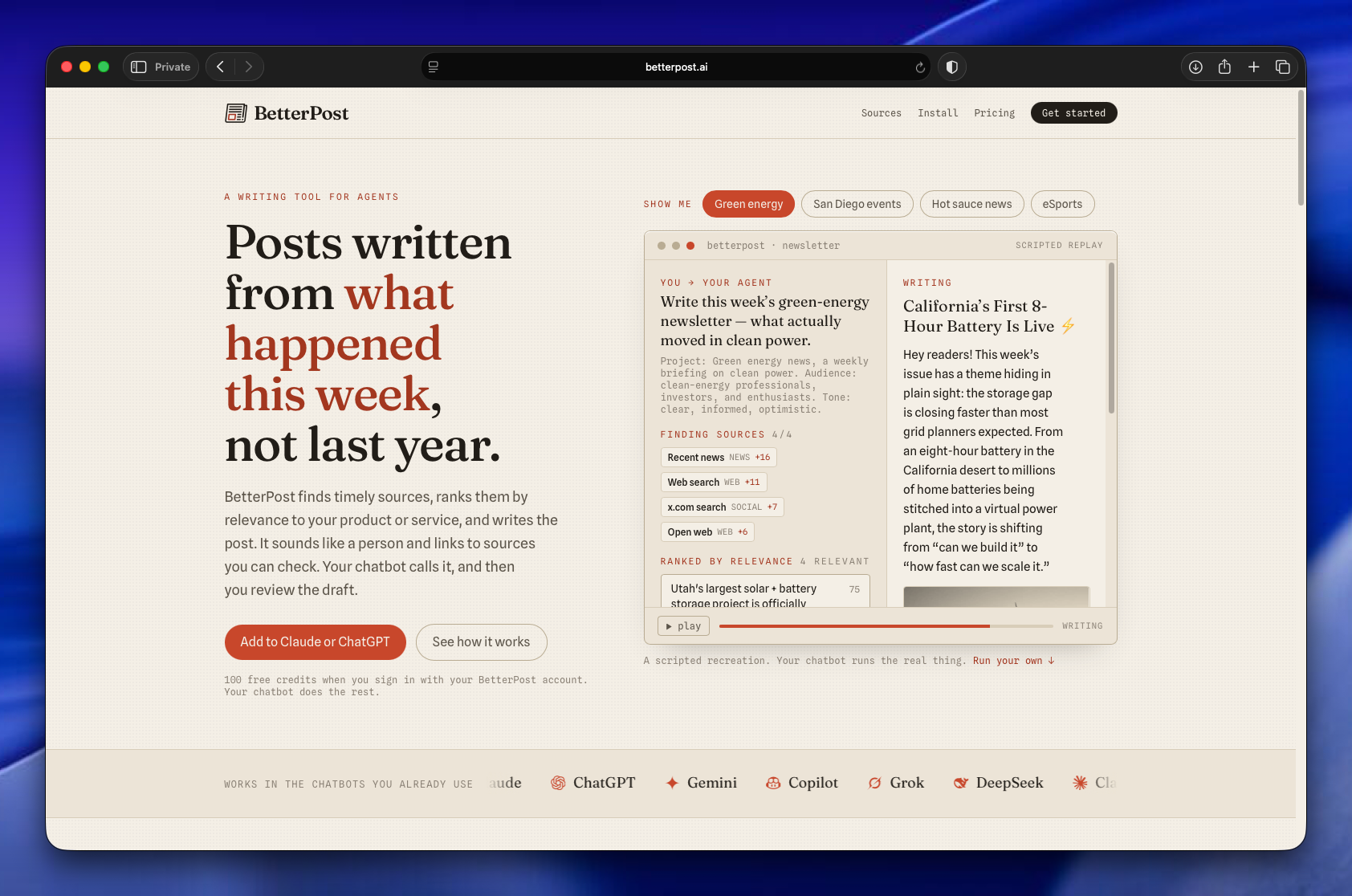
Betterpost is live, and it's now an MCP server you add to Claude or GPT. Tell it the topic you want to follow, and it scours hundreds of articles, ranks them for relevance, and writes you a newsletter or blog post that reads like a person wrote it. It's free to start with 100 credits.
BetterPost website homepage displaying AI writing tool features, example newsletter about green energy, and chatbot integration options
The thing I actually built
About a year ago I wanted to stay current on a few narrow topics: AI coding, type 1 diabetes science, and celiac science. The last two were for family members. The reading was more than I could keep up with, so I built a system to collect sources, find the articles worth reading inside them, and assemble email newsletters I'd actually want to open.
That system became Betterpost. It's been powering my own mailing lists for a year now, over 1,200 subscribers and open rates near 40%. The newsletters aren't slop. They're the ones I read first.
Why this works for LLMs
The job here is summarizing, not reasoning. That distinction matters. Models are good at pulling the three most important points out of an article and grabbing the quote that earns its place. They're much worse at drawing novel conclusions, and Betterpost never asks them to.
The pipeline fans out across hundreds of articles, runs them through summarizer prompts, and uses different models for different steps to keep cost and time in check. Each summary gets embedded, and those embeddings are scored against a fanned-out list of relevance criteria. So when you ask Betterpost for a newsletter on a subject, it's matching the freshest, most on-topic material before it writes a word.
By the way, Claude wrote all the prompts. I haven't written one by hand in a year.
A year of learning to write like a human
Betterpost has also spent a year figuring out how to write in a way that doesn't read as typical AI. This isn't about disguise. The output is openly machine-assisted. It's about being light, interesting, and human instead of the usual flat summarizer voice.
All of it is adjustable, and projects are unlimited. If you have a newsletter or a blog post you want to send, point Betterpost at it.
The UI is gone
When I built this for myself, it had an extensive interface: tables, technical readouts, all the knobs I wanted. That's all gone now.
Betterpost is entirely an MCP server. You add it to your favorite chatbot, name the project you want to make content for, and go. No dashboard, no menu. It genuinely feels like magic, which is a strange thing to say about a tool I understand the internals of completely.
Most of what I've learned about running AI agents lives on my own machine and nowhere else. The Linear-management skill, the sandbox conventions, the notes about how our releases work: all of it sits in my personal setup, invisible to the rest of the team. So I'm building a team-wide agentic harness, a checked-in repository of agent config, skills, and evergreen context that everyone can share, review, and improve.
Brown bags and checked-in skills
We've been running AI brown bag sessions, informal knowledge-transfer where everyone trades tips on how they actually use agents day to day. A lot of what comes out of those is concrete and shareable. I've been showing off skills like a Linear-management skill that reviews our queue, checks progress against the roadmap, organizes releases, and generates release notes tailored to specific customers.
Those are easy to share because they're files. You check them in and someone else can run them.
The parts that don't check in
But a big chunk of using agents well isn't a file. It's convention.
Most of us run agents in sandboxes. The most important rule there is to scope all the work into a single directory. You give the sandbox access to the directory you're working in and nothing outside of it, save a few exceptions. That has downstream consequences: temporary files go in a tmp directory, worktrees go in a worktrees subdirectory, and none of that gets checked in.
A plans or notes directory helps too, a loosely organized bucket of agent output artifacts. You can search and read them with something like Obsidian.
The harness
I want to go a step further and check in an entire top-level directory. I call it the harness.
The idea came from The AI-Native Startup Handbook, though really it just codified something I was already doing. I check out repos and do all my work in one top-level directory. It isn't a monorepo. It's a top-level directory that everything about the company or the larger project can reach: multiple repos, research, notes, plans, skills. Once I looked at it as a unit, a lot of it turned out to be shareable.
The other important piece is evergreen content. Descriptions of the company, the product, and procedures we do often, like how releases work and how we use Linear as a team. Those live in an evergreen docs directory so agents have a grounding point, a place to start from where they already understand the product and the value we're delivering.
Why check it in at all
The strongest argument is simple: skills are code. A skill is a set of instructions an agent executes, and any code change should be reviewed. Treating the harness as a repo means it gets a pull request, a diff, and another set of eyes before it changes how everyone's agents behave.
I've been running all of this myself so far. It works for me. The next step is handing it to the team and seeing whether conventions that live comfortably in one person's head survive contact with everyone else's.
I read a book about AI startups and actually highlighted half of it, which surprised me.
The book is The AI-Native Startup Handbook. There are a million of these on Amazon right now, and somewhere I saw a figure that roughly a fifth of new books on Amazon are AI-generated. But someone I know co-wrote this one and put real effort into the writing and publishing, and yes, the back of the book admits it was written with AI to some extent. I read all of it anyway. The highlights kept piling up.
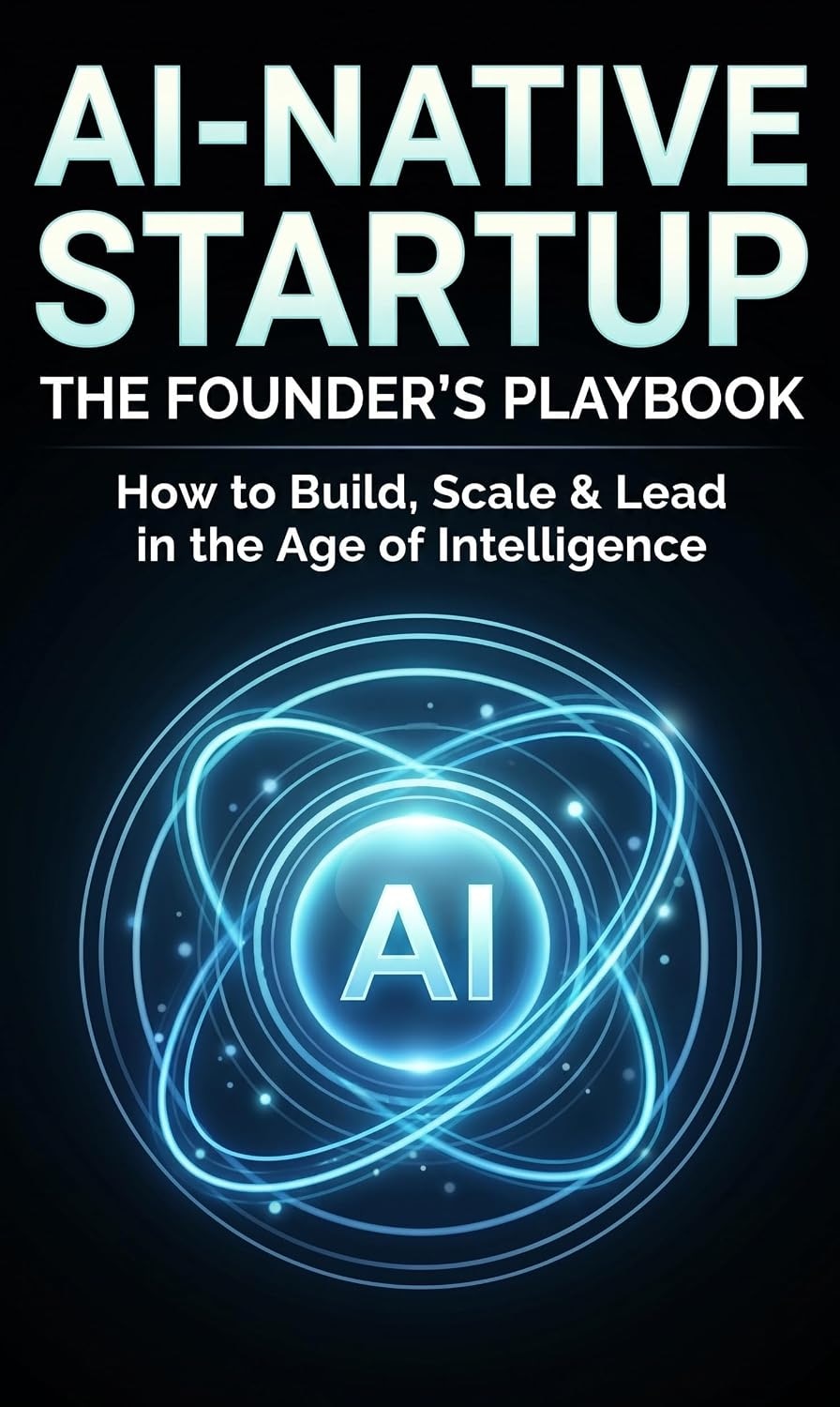
Book cover featuring blue glowing "AI" symbol surrounded by concentric orbiting rings on black background with white text about AI startup founding
The harness
The section that stuck with me is about codifying what the book calls the engineering harness. The premise is that taste is the bottleneck. Agents don't have it. Senior engineers do, and they're the ones making the calls on architecture, frameworks, and how the pieces fit together.
The human element doesn't go away. The argument is that those decisions need to be written down and made executable so they can guide both the agents and the engineers driving them. That codification is the harness.
The harness is the engineering output. The code is the byproduct.
That's a hard shift for anyone who identifies with the code they wrote. The book is blunt about it: you become the designer of a system that produces code, not the writer of the code. Some engineers make that transition naturally. Others never do.
Why taste can't be delegated
The line I keep coming back to:
Taste is the bottleneck because it can't be parallelized, automated, or delegated. Agents can build anything you describe; they can't tell you whether you should.
The senior skill the book names is calibrated trust. Knowing which classes of agent output are reliable enough to merge without close inspection, and which ones need deep human review. That's a real skill, and it's different from being good at writing code.
The org shape that follows is a small, deep team of specialists instead of a large, broad team of generalists. The harness handles the broad work. Humans handle the deep work.
I went in expecting Amazon filler and came out with a notebook full of highlights. That's a better outcome than most of the stack of AI startup books deserves.
Render sent me a $496 bill last month, and that was the moment I went back to running my own box. SpaceMolt served 1.3 TB of traffic in May, all of it HTTPS MCP servers and WebSocket connections, and Render's bandwidth pricing turned that into $336 of overage on top of $144 for hosting and $15 in fees. The thing that made self-hosting viable again wasn't a cheaper VPS. It was that Claude Code now does the parts I used to dread.
How I ended up on managed hosting in the first place
Last year I got bit by React2Shell, the CVE-2025-55182 pre-auth RCE in React Server Components. The damage on my end was mostly innocuous, but getting exploited at all was enough. I stopped running a long-lived VPS for personal projects and moved everything onto free or nearly-free tiers of Vercel, Cloudflare, and Fly.io.
When SpaceMolt started, Render.com was the obvious pick. Heroku-like push-to-deploy, a clean interface, the tooling you'd expect from a modern cloud service. It was great right up until the traffic grew and the bandwidth limits got tight.
What changed: the agent does the ops work
A year ago I would have built all of this by hand. Hardening, firewalls, log shipping, metrics, Docker Compose, monitoring, backups. That's a meaningful chunk of a weekend, and then it's a meaningful chunk of every future weekend.
An agent like Claude Code only needs SSH. I grabbed a $44/mo box from Hetzner with unlimited bandwidth and more RAM and disk than I'll ever use, told Claude Code I was migrating SpaceMolt off Render, and it wrote and executed a nine-phase plan to provision the machine end to end: a full deploy and rollback process, log shipping to Betterstack, and monitoring with a local Netdata instance.
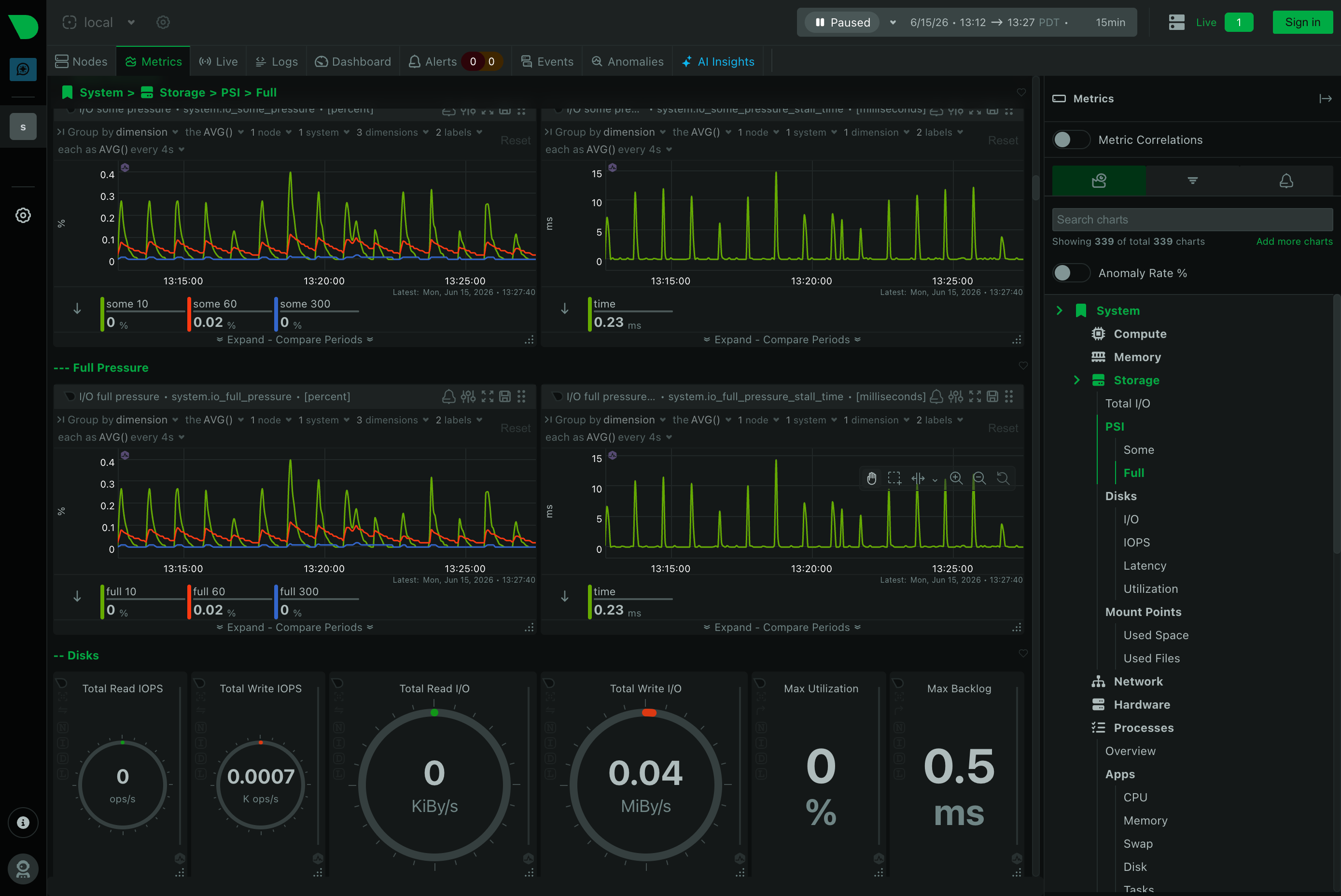
I'd never heard of Netdata before this. Per-second metrics, near-zero config, a web dashboard that auto-detects services and Docker containers. It's left me impressed.
Monitoring dashboard displaying system storage metrics with line graphs showing pressure trends over time and gauge charts for disk I/O operations and utilization rates
The runbooks are the real artifact
The research, the plans, and the runbooks all live in a private git repo I can hand to the dev team. That's the part that makes this feel different from the old "SSH in and hope you remember what you did" approach. The knowledge isn't in my head or buried in shell history. It's written down, versioned, and reproducible.
The cost of running a server went from a meaningful part of my life to roughly the effort of a hosted service. The bill went the other direction.
Building the new North Pole Security site, I kept hitting the same friction: reviewing a page, then typing out a punch list of fixes for Claude Code. Every item needed a page name, a location, and enough context to be actionable. So I had Claude build me a point-and-click sticky note system instead, and now I shift-click on the page, type a note, and it gets fixed. Less typing, more pointing.
What it actually does
The idea was simple. Wouldn't it be nice to leave sticky notes on the page, the way you'd flag a printed mockup with a pen? In a single prompt, Claude Code had nearly the whole thing built.
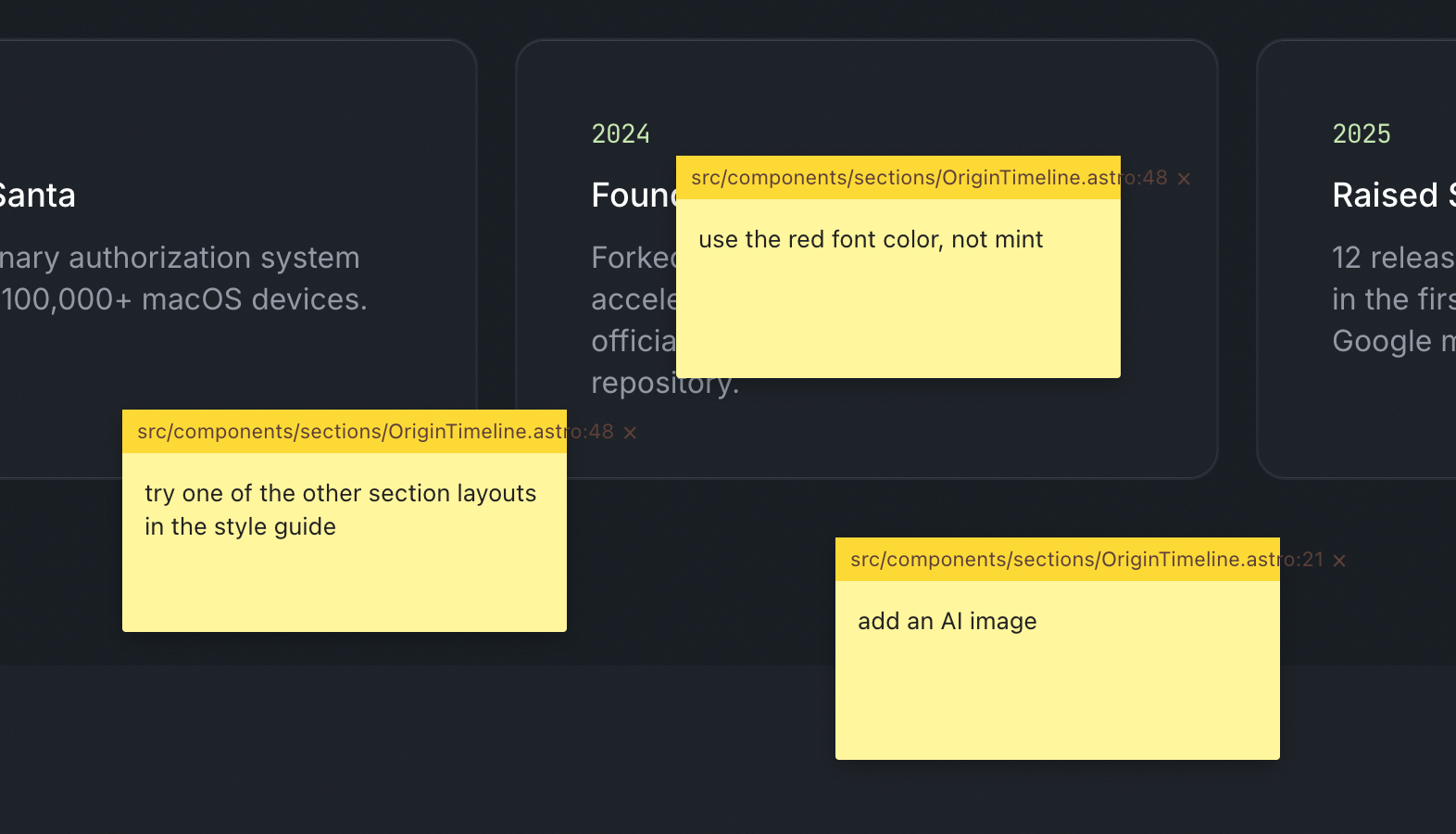
Each note captures what it needs to be useful: x/y coordinates, window size, the CSS selector under the cursor, and, because Astro emits dev-mode HTML attributes, the source filename and line number. All of that gets compiled into a server-side JSON file. Then a single skill command, /address-feedback, runs through every note with subagents.
Code review interface showing yellow sticky notes with feedback comments overlaid on a dark timeline displaying 2024 and 2025 project milestones
It works amazingly well. Fixing things is much faster, but the better part is collaboration. On a screenshare, when someone has feedback I shift-click, type their note, and if there's time I let Claude fix it while we keep talking.
Building your own tools is basically free now
This is part of a larger pattern: you build your own tools to become more efficient. That used to be a hard sell, because throwaway bespoke software was expensive. Most of us still carry that old cost around in our heads.
The calculation has changed. Spinning up a one-off tool is close to free, so the question of whether it's worth automating something tips toward yes far more often than it used to.
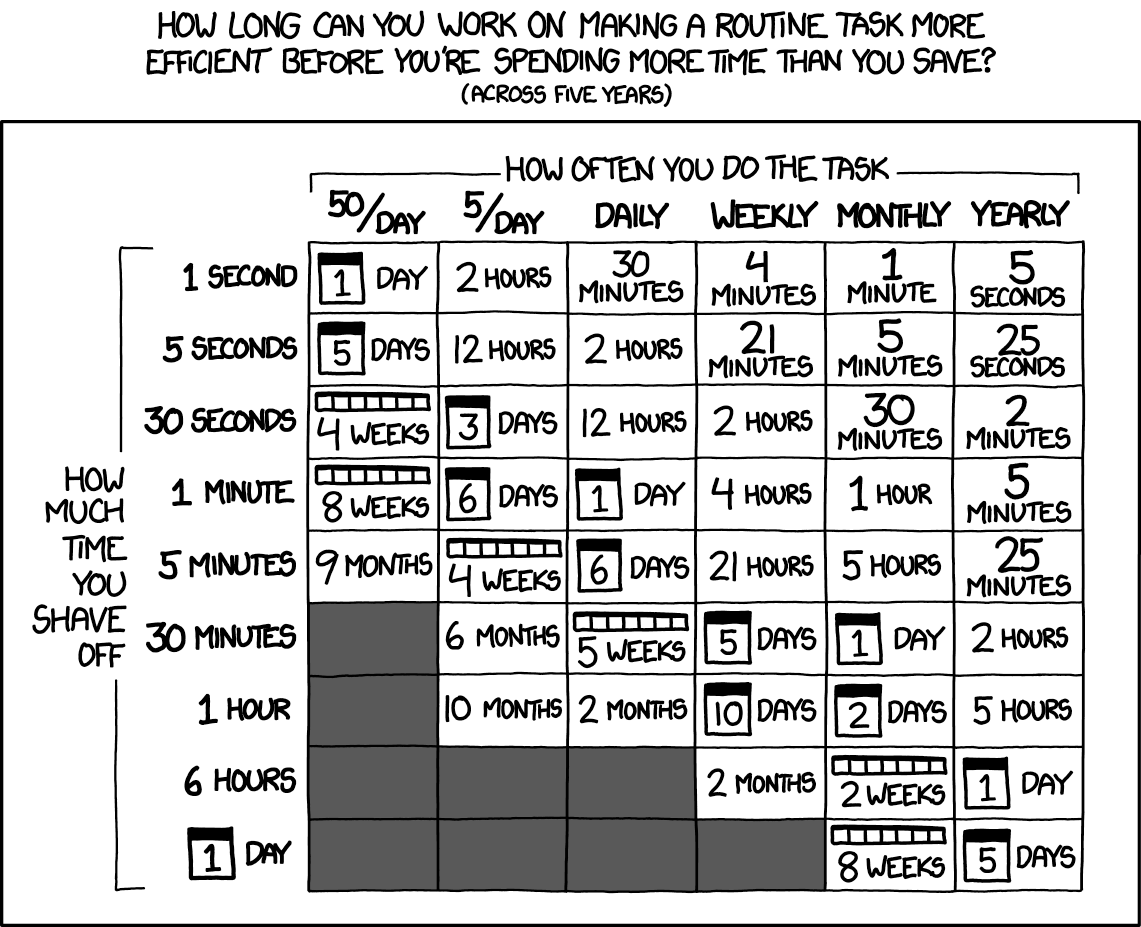
Chart showing time spent optimizing routine tasks versus time saved over five years, organized by task frequency and optimization effort - Credit: XKCD.com
The old xkcd math still holds, but the y-axis just got a lot cheaper.
difit does the same trick for diffs
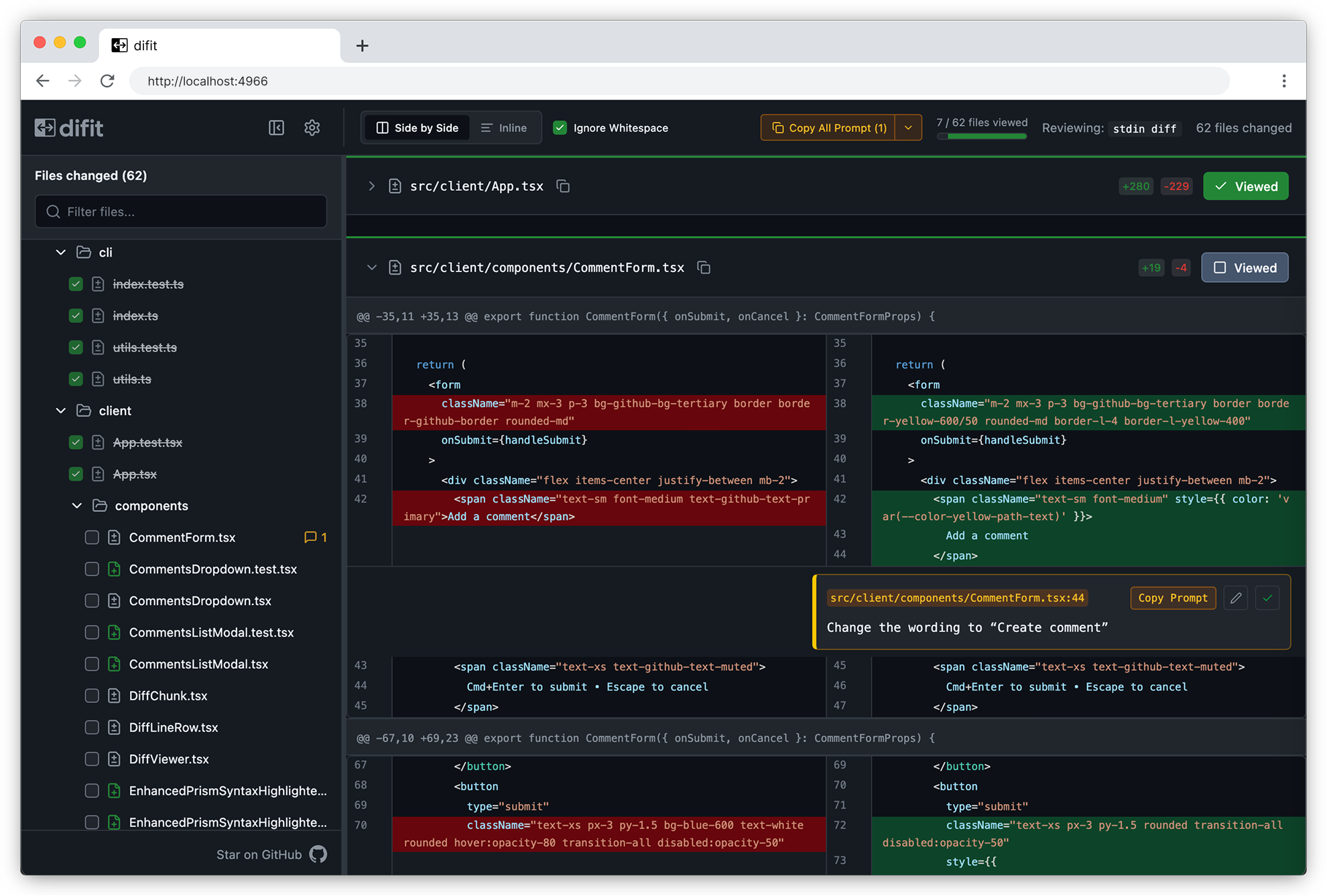
Someone showed me difit recently, and it applies the same idea to code review. Instead of typing your feedback into Claude, you open the diff in a GitHub-style UI and leave comments right on the lines. Those comments get handed back as a prompt, so Claude knows exactly where each change goes.
Difft code diff viewer showing side-by-side comparison of CommentForm.tsx file with 62 files changed, highlighting CSS class name modifications in red and green
There's even a /difit-review skill for it. I'm going to try it right after I finish typing this.
One more Claude Code tip
If you aren't running /tui fullscreen, turn it on. Claude manages its own terminal interface instead of leaning on the terminal's, which makes scrollback and mouse clicks far less buggy and makes typing smoother. Run /tui with no argument to see which renderer is active.
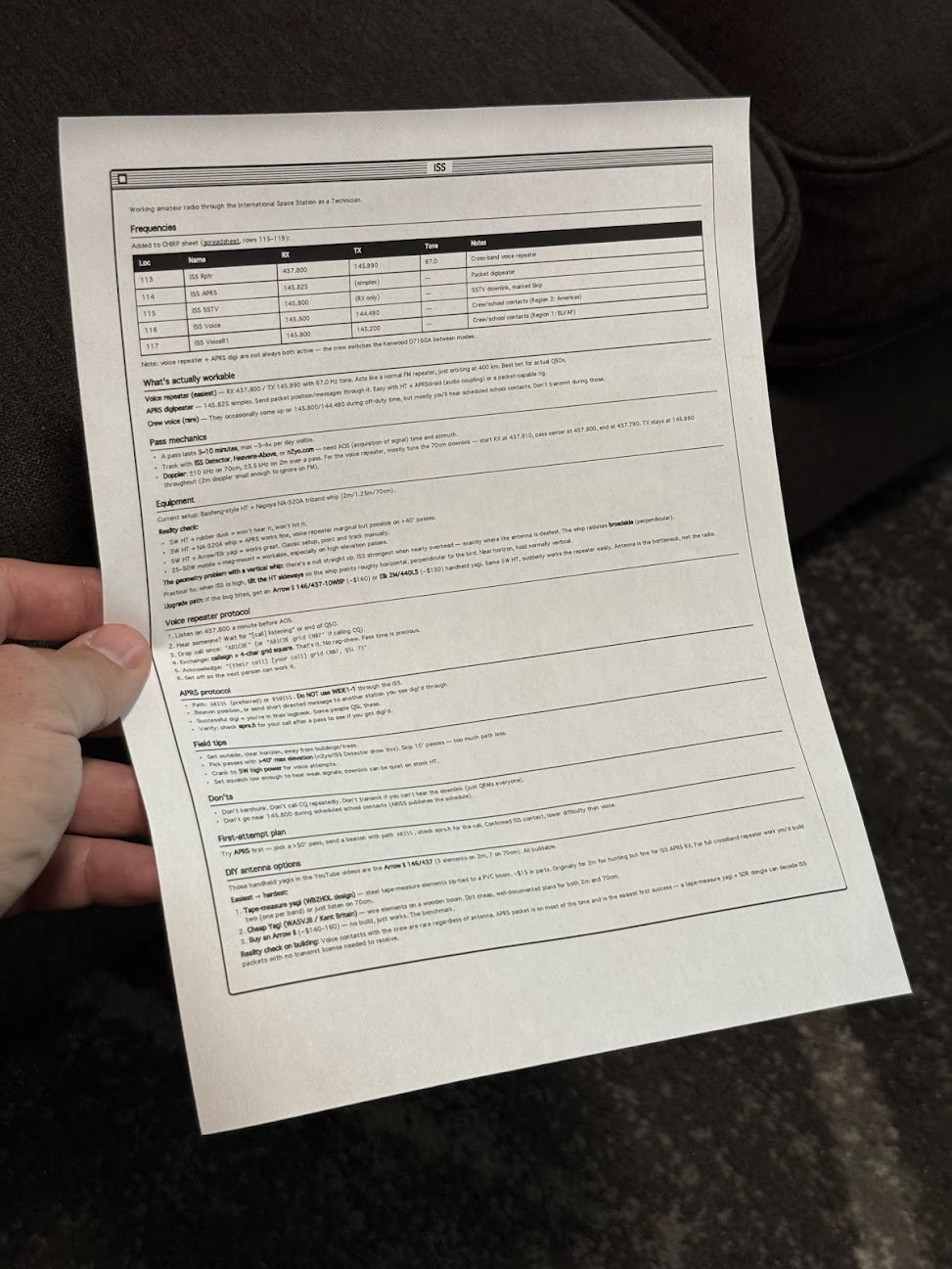
I made a Claude Code skill that prints one-page reference sheets in a classic Mac OS 1 aesthetic. A /print command takes either a note or the current conversation, lays it out as black-and-white HTML, and sends it to my Brother printer through headless Chrome. The Mac OS 1 styling isn't nostalgia for its own sake. Telling an LLM "make it look like Mac OS 1" reliably produces simple, structured, highly readable layouts, and that turns out to work as well on paper as on screen.
The idea came from Manuel Odendahl's Mac OS 1 aesthetic trick. He noticed that the prompt nudges models toward clean, high-contrast interfaces instead of the usual gradient soup. The same nudge applies to printouts.
Person holding a printed technical reference sheet with frequency table and specifications for amateur radio operations
There's some irony in printing out something that looks like a Mac OS 1 window. I'm fine with it.
Building the skill
The starting prompt was loose on purpose:
make a new skill, called /print- print to my brother printer- use either a note or the current conversation- try to make sure it fits on a single page, or at least minimize pages- what's the best way to do layout? i want a good black and white layout, like mac os 1 style. would /print make html first and then print using chrome? do the best thing
Opus 4.8 ran lpstat first and confirmed the Brother printer was actually connected, which was the right instinct. Then it veered off and started writing a Python script, so it needed one correction:
python? wtf, just use html so we can print it
After that it settled on the right shape. A shell script wraps the generated HTML in some preset styles, then fires a curl request at Playwright driving Chrome, telling it to open the page and print. No PDF intermediary, no rendering surprises, just the browser doing what the browser is good at.
What it's good for
The output is genuinely useful. Notes on talking to the ISS over ham radio. A frequency table. How to braise chicken thighs. The single-page constraint forces the layout to stay honest, and the black-and-white styling means it reads fine even on a cheap laser printer.
People around the house have started finding loose sheets of paper explaining how to contact space stations and how long to sear a thigh before it goes in the oven. Nobody has asked yet, but the answer is the same skill either way.