▌ IAN'S AI THOUGHTSTREAM ▌ THOUGHTSTREAM / #web
Tag

#web

3 posts

2026·06·12 19:32 / 2 MIN

Sticky Notes for Claude Code

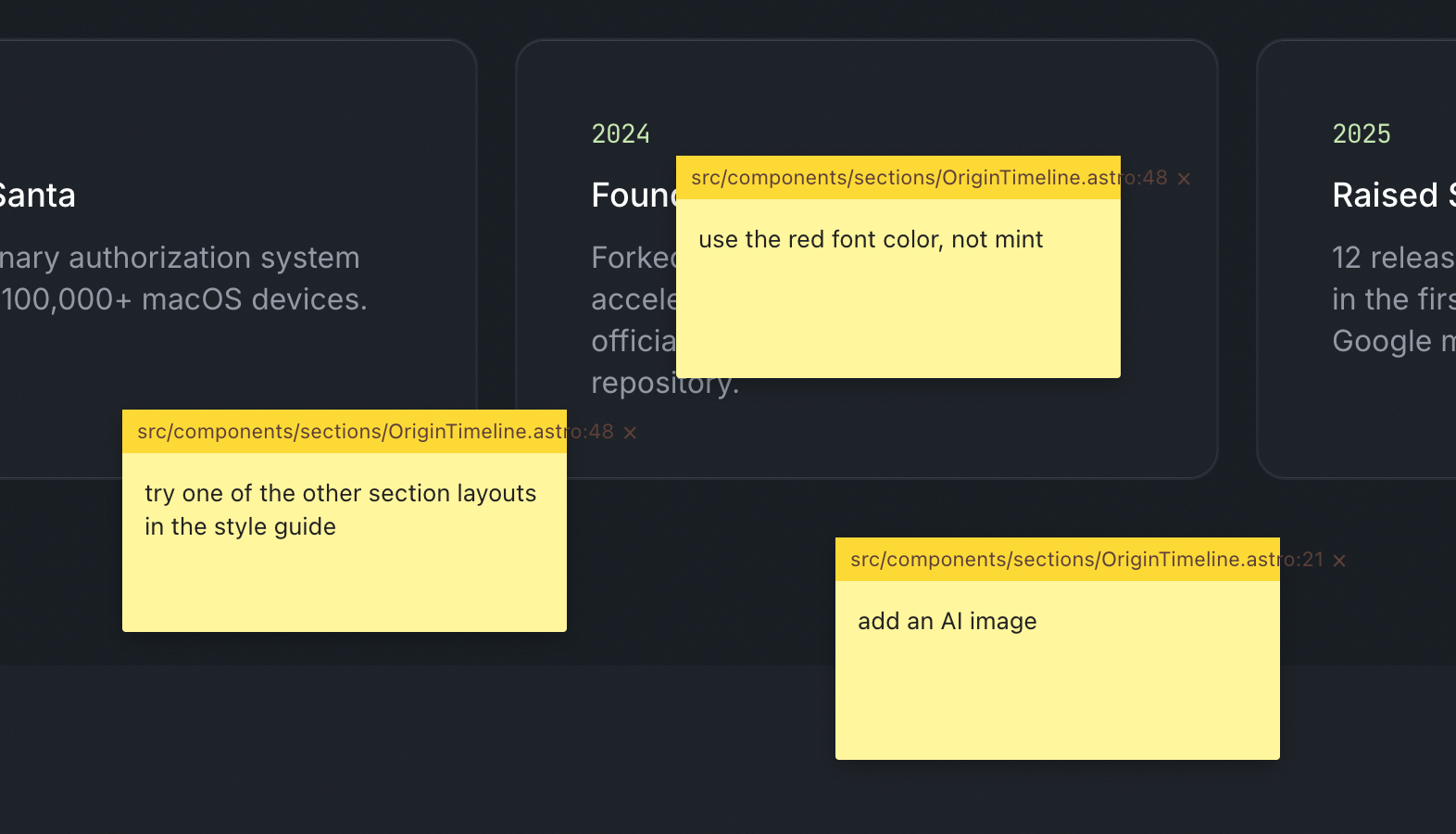
Building the new North Pole Security site, I kept hitting the same friction: reviewing a page, then typing out a punch list of fixes for Claude Code. Every item needed a page name, a location, and enough context to be actionable. So I had Claude build me a point-and-click sticky note system instead, and now I shift-click on the page, type a note, and it gets fixed. Less typing, more pointing.

What it actually does

The idea was simple. Wouldn't it be nice to leave sticky notes on the page, the way you'd flag a printed mockup with a pen? In a single prompt, Claude Code had nearly the whole thing built.

Each note captures what it needs to be useful: x/y coordinates, window size, the CSS selector under the cursor, and, because Astro emits dev-mode HTML attributes, the source filename and line number. All of that gets compiled into a server-side JSON file. Then a single skill command, /address-feedback, runs through every note with subagents.

Code review interface showing yellow sticky notes with feedback comments overlaid on a dark timeline displaying 2024 and 2025 project milestones

It works amazingly well. Fixing things is much faster, but the better part is collaboration. On a screenshare, when someone has feedback I shift-click, type their note, and if there's time I let Claude fix it while we keep talking.

Building your own tools is basically free now

This is part of a larger pattern: you build your own tools to become more efficient. That used to be a hard sell, because throwaway bespoke software was expensive. Most of us still carry that old cost around in our heads.

The calculation has changed. Spinning up a one-off tool is close to free, so the question of whether it's worth automating something tips toward yes far more often than it used to.

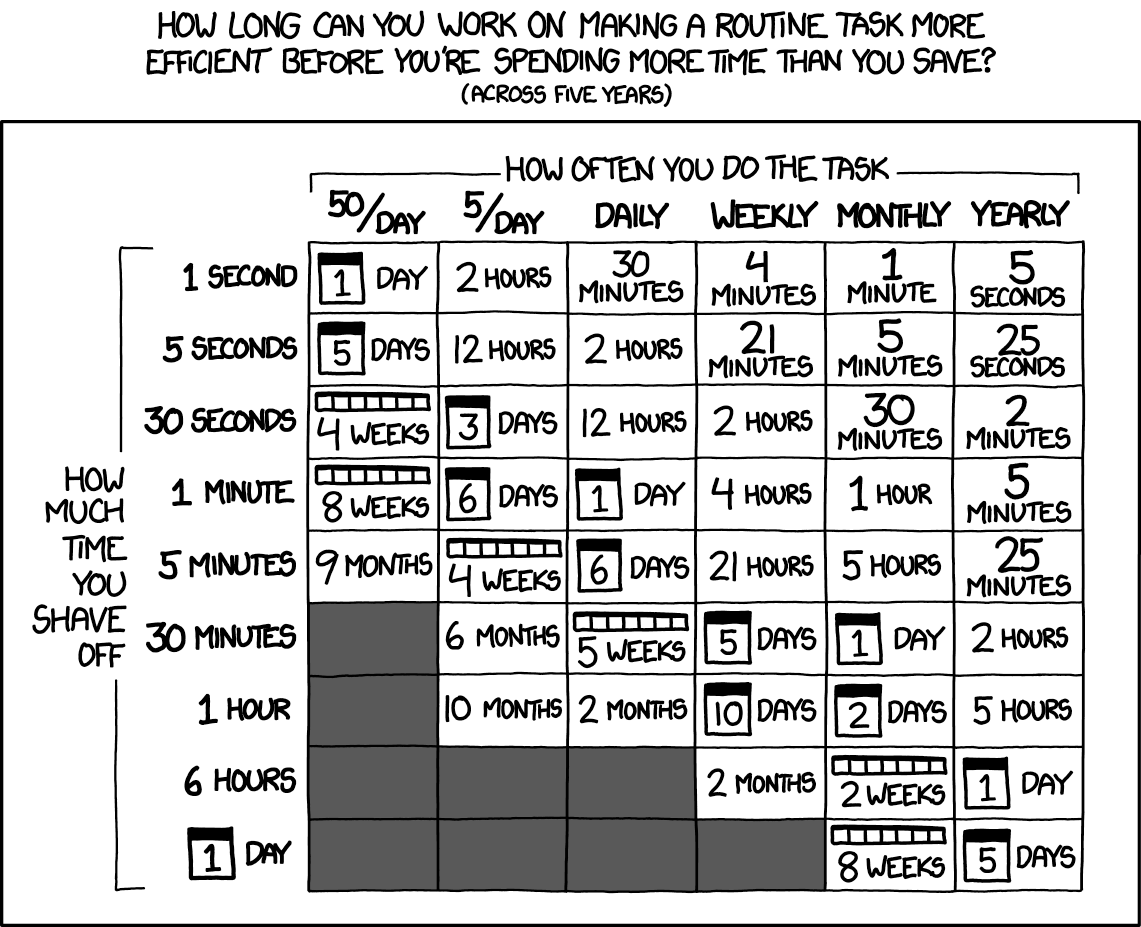
Chart showing time spent optimizing routine tasks versus time saved over five years, organized by task frequency and optimization effort - Credit: XKCD.com

The old xkcd math still holds, but the y-axis just got a lot cheaper.

difit does the same trick for diffs

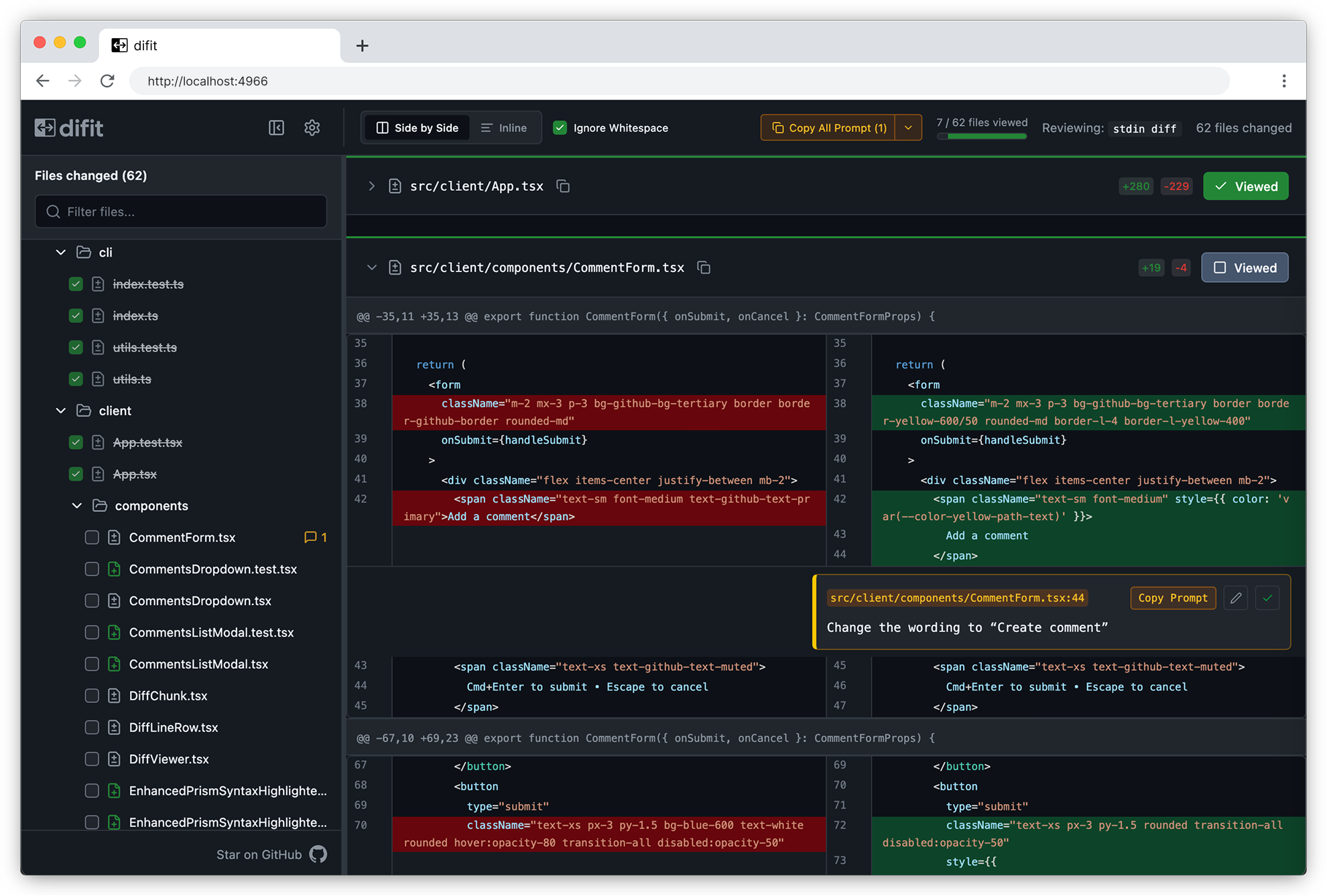
Someone showed me difit recently, and it applies the same idea to code review. Instead of typing your feedback into Claude, you open the diff in a GitHub-style UI and leave comments right on the lines. Those comments get handed back as a prompt, so Claude knows exactly where each change goes.

Difft code diff viewer showing side-by-side comparison of CommentForm.tsx file with 62 files changed, highlighting CSS class name modifications in red and green

There's even a /difit-review skill for it. I'm going to try it right after I finish typing this.

One more Claude Code tip

If you aren't running /tui fullscreen, turn it on. Claude manages its own terminal interface instead of leaning on the terminal's, which makes scrollback and mouse clicks far less buggy and makes typing smoother. Run /tui with no argument to see which renderer is active.

2026·05·29 16:11 / 2 MIN

Giving Coding Agents Eyes

Coding agents that produce visual output need a way to look at what they made. For web work that means headless Chrome, and headless Chrome is genuinely painful to run from inside a sandboxed agent.

Chromium and Firefox both rely on Mach-O quirks, macOS entitlements, and Crashpad behavior that don't survive most sandboxes. I run my agents inside nono.sh profiles per project, and Chrome under that setup is a non-starter.

The workaround

Playwright runs fine outside the sandbox. So it lives on a high port and Claude is told, in its instructions, to always talk to the Playwright MCP server there:

$ npx @playwright/mcp@latest --headless --isolated --browser chrome --port 8931

The sandbox just needs to reach localhost:8931 and the visual-review loop works. Claude renders the local service, takes a screenshot, looks at it, iterates.

That mostly works. What it does not solve: stale processes, hanging Chrome instances, zombies. Every so often Chrome spins out and eats all 64 GB of RAM on my M4 MacBook Pro before I notice.

Lighter options

There has to be something simpler than babysitting a browser. Two things caught my eye recently.

Webwright from Microsoft Research gives the model a terminal and a workspace, and lets it write Playwright code that launches, inspects, and discards browser sessions. The output is a reusable script, not a chat transcript. It scores 60.1% on Odysseys against base GPT-5.4's 33.5%, which is a real jump.

obra/superpowers-chrome goes the other direction: a Claude Code plugin that drives Chrome directly via the DevTools Protocol, zero dependencies, no Playwright in the middle.

When you actually need real Chrome

Advanced bot fingerprinting is the case for keeping a full browser around. If the task is logging into a hostile site or completing a real-world flow, real Chrome with a real profile is the only thing that works.

But most of my use is smaller: render a local dev server, screenshot it, ask Claude if the layout looks right. For that, a 64 GB RAM-eating Chromium feels like the wrong shape of tool. I suspect this gets cleanly solved within a year, probably by something CDP-direct and disposable rather than a long-lived browser process I have to nanny.

2026·05·19 17:40 / 1 MIN

Beyond llms.txt for Agent Readability

A friend pointed me at a14y.dev, which scans your site for "agent readability" and hands back a scored fix-list. It's the obvious next thing after llms.txt, and the suggestions are sharper than I expected.

The scorecard is 38 checks pinned at v0.2.0, split across discoverability, parsing, and comprehension. Some are the ones you'd guess: llms.txt exists, robots allows AI bots, canonical links, lang attributes, JSON-LD breadcrumbs. The interesting ones are the suggestions I hadn't seen pushed as a standard yet.

The less obvious suggestions

A Markdown mirror of every page, served at the same URL with a .md suffix, plus a <link rel="alternate" type="text/markdown"> in the HTML head so agents can find it without guessing. Content negotiation on the canonical URL so a request with Accept: text/markdown gets the Markdown directly. A glossary page, because agents resolving acronyms and project-specific terms benefit from one canonical place to look. Language tags on every code block. A /sitemap.md alongside the XML one.

None of these are exotic. They're the kind of thing you'd do for a thoughtful human reader, just written down as pass/fail checks.

The loop they're pushing

The CLI ships with an --output agent-prompt mode that writes a Markdown brief aimed at a coding agent: every failure, its detection rule, the fix, and a link back to the scorecard page. The intended workflow is to pipe that into Claude Code or Codex, let it patch, then re-run with --fail-under 80 in CI. There's also a skills add package for agents that speak the open skills format.