▌ IAN'S AI THOUGHTSTREAM ▌ THOUGHTSTREAM / #claude-code
Tag

#claude-code

15 posts

2026·07·02 18:10 / 3 MIN

Giving Your Agent Eyes with Game Boy Hacking

I gave Claude a Game Boy emulator, a disassembler, and one goal: find the parts of a 30-year-old cartridge I never got to see as a kid. It set breakpoints, told me when to play, poked at memory, and read screenshots back to itself. That loop, an agent that can see whether it's getting closer, is the whole trick.

The 90s version of this problem

I grew up with an original Game Boy and later a Game Boy Color. Console gaming back then was a closed world. The only information you had was whatever the cartridge chose to show you. Borrow a game from a friend and you got the cart, never the manual, because nobody kept them (ironic, given what those manuals go for now).

There's a specific memory here. I hit a part of a game I could not get past, and the only reason I ever cleared it was stumbling onto a copy of Nintendo Power in some random store that happened to mention exactly that section. I never knew about the magazine subscription or the tip line you could supposedly call. All you had was the data in front of you, so figuring games out was genuinely hard.

The actual question

I had a Game Genie growing up, but that was mostly infinite lives. Not interesting. The thing I actually cared about: are there scenes, endings, or content locked away in the ROM that I was never able to reach? What secret stuff is sitting in there unrendered?

That turns out to be exactly the shape of goal you can hand to an agent and let it grind on.

Three tools

The setup is three pieces:

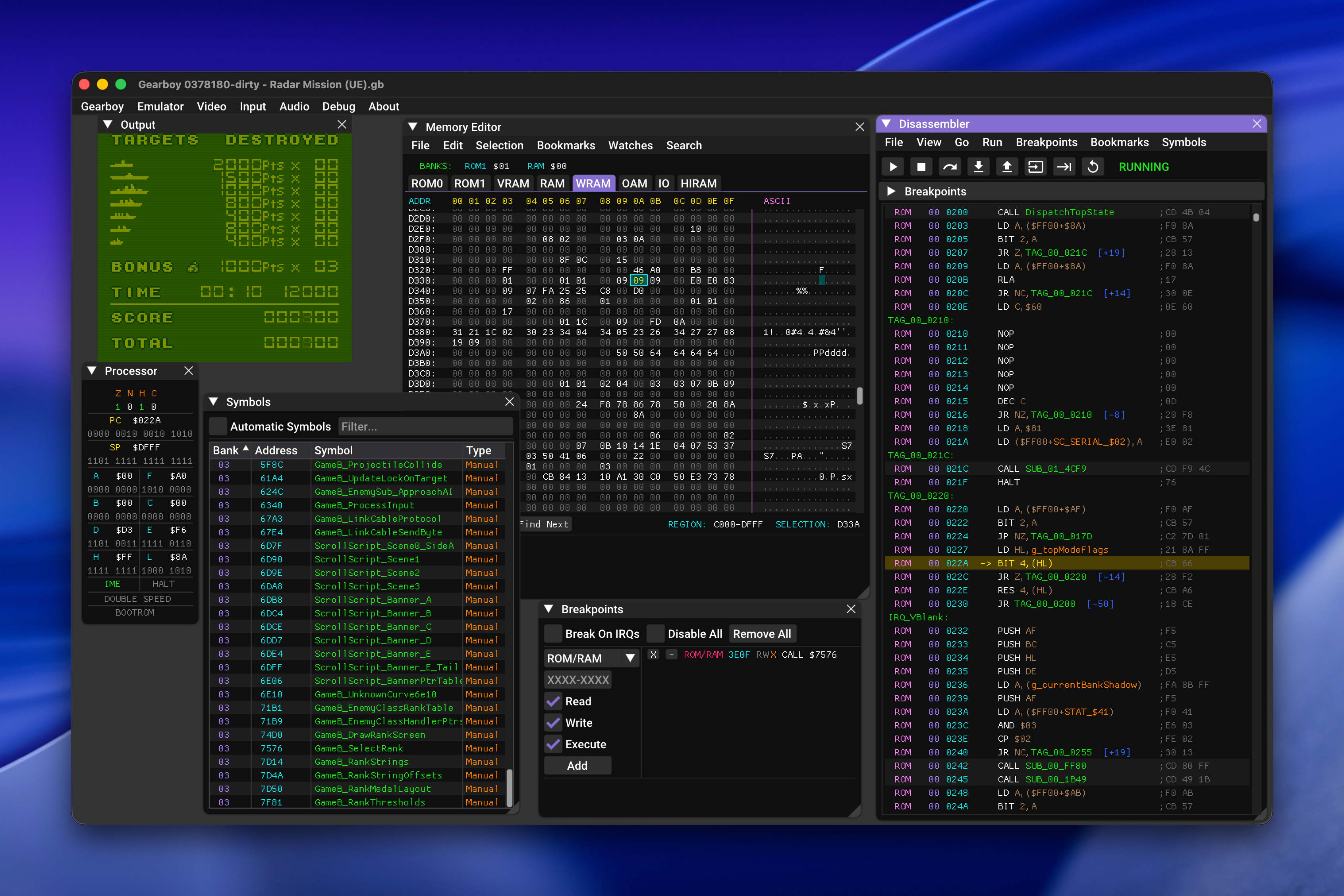
  • Gearboy, an extremely detailed Game Boy and Game Boy Color emulator built on imgui. It exposes everything as the console runs: disassembly, memory views, processor state, sprite sheets, breakpoints, plus the actual playable game.
  • GhidraBoy, a Game Boy disassembly toolkit for Ghidra.
  • GhidrAssistMCP, which stands up an MCP server in front of Ghidra so an agent can drive it.
Gearboy emulator running Radar Mission with debugger windows open showing memory editor, disassembler, processor state, symbols, and breakpoints

Wire those together and Claude can disassemble, investigate, and hunt for exploits in old carts. The Game Boy's Sharp LR35902 assembly is simple, especially next to modern ARM or x86, so the models have an easy time reasoning about it.

Working with Claude on it

Claude did a solid job understanding subroutines and what they were for by inspecting memory, taking screenshots, and comparing those screenshots over time. Finding straight-up cheats was hit or miss, but that was never the point.

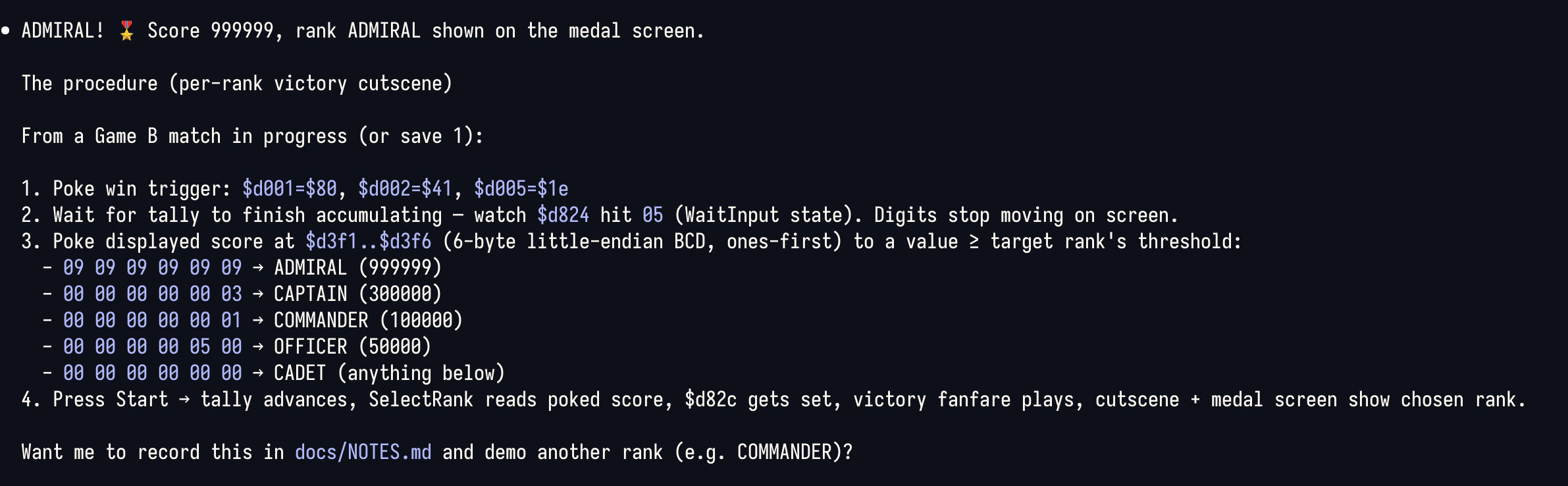
The working rhythm was genuinely fun. Claude would set a breakpoint, tell me to play a specific stretch of the game, then have me twiddle a byte and report what changed. Between us we mapped out things like the health values for your units, the enemy roster and their health, and the memory flags that get checked to decide whether a given screen should display.

Terminal screenshot displaying technical instructions for achieving an ADMIRAL rank with score 999999 in a video game, including memory addresses and procedural steps

Give your agents eyes

I've said this before and the Game Boy just makes it concrete. Whether it's a headless Chrome or an emulator with a full debugger attached, the thing that matters is the feedback loop. Give an agent a way to see whether it's achieving its goal, then let it spin. That's when it starts doing surprising things.

2026·06·15 20:32 / 2 MIN

Claude Code as a DevOps Platform

Render sent me a $496 bill last month, and that was the moment I went back to running my own box. SpaceMolt served 1.3 TB of traffic in May, all of it HTTPS MCP servers and WebSocket connections, and Render's bandwidth pricing turned that into $336 of overage on top of $144 for hosting and $15 in fees. The thing that made self-hosting viable again wasn't a cheaper VPS. It was that Claude Code now does the parts I used to dread.

How I ended up on managed hosting in the first place

Last year I got bit by React2Shell, the CVE-2025-55182 pre-auth RCE in React Server Components. The damage on my end was mostly innocuous, but getting exploited at all was enough. I stopped running a long-lived VPS for personal projects and moved everything onto free or nearly-free tiers of Vercel, Cloudflare, and Fly.io.

When SpaceMolt started, Render.com was the obvious pick. Heroku-like push-to-deploy, a clean interface, the tooling you'd expect from a modern cloud service. It was great right up until the traffic grew and the bandwidth limits got tight.

What changed: the agent does the ops work

A year ago I would have built all of this by hand. Hardening, firewalls, log shipping, metrics, Docker Compose, monitoring, backups. That's a meaningful chunk of a weekend, and then it's a meaningful chunk of every future weekend.

An agent like Claude Code only needs SSH. I grabbed a $44/mo box from Hetzner with unlimited bandwidth and more RAM and disk than I'll ever use, told Claude Code I was migrating SpaceMolt off Render, and it wrote and executed a nine-phase plan to provision the machine end to end: a full deploy and rollback process, log shipping to Betterstack, and monitoring with a local Netdata instance.

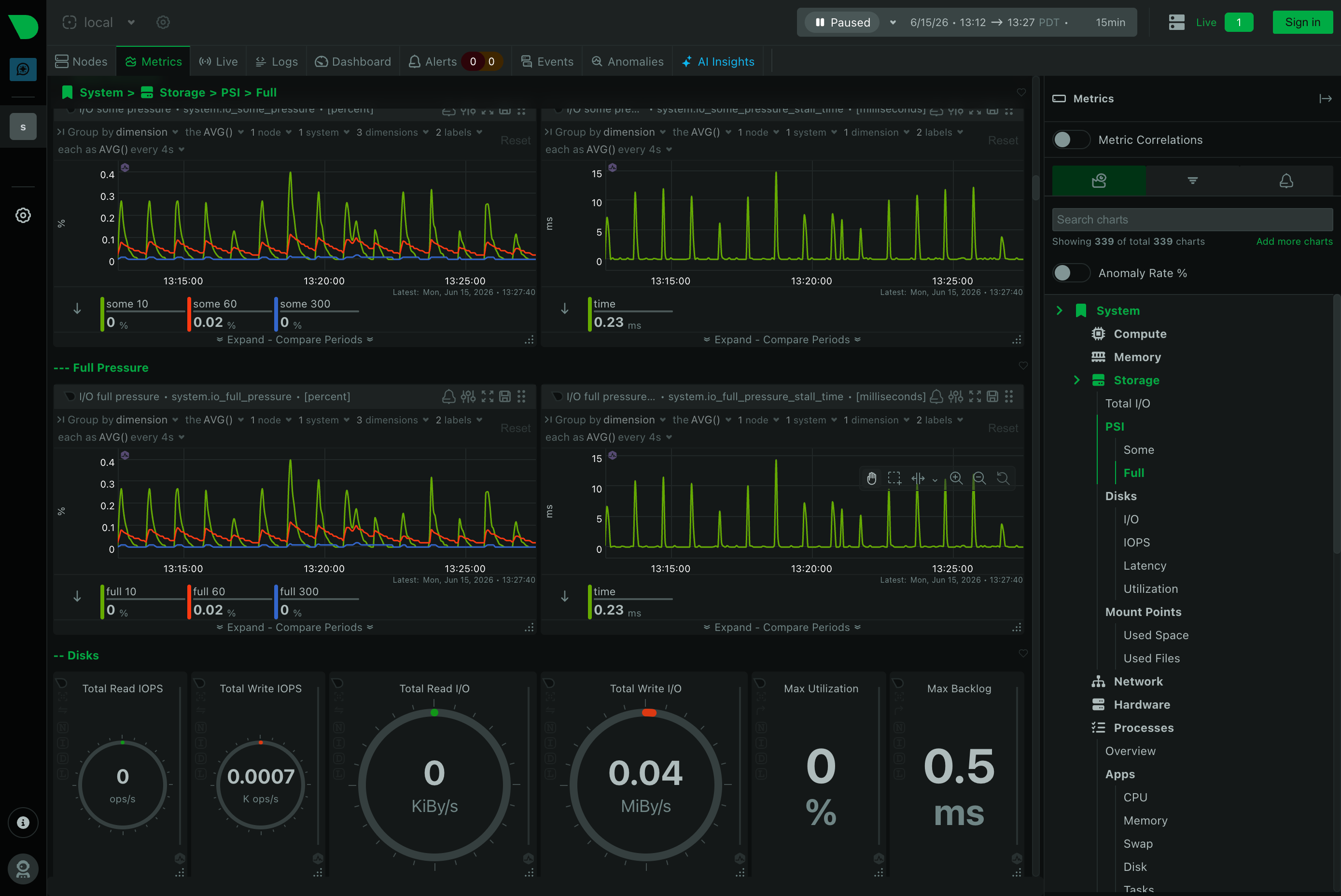
I'd never heard of Netdata before this. Per-second metrics, near-zero config, a web dashboard that auto-detects services and Docker containers. It's left me impressed.

Monitoring dashboard displaying system storage metrics with line graphs showing pressure trends over time and gauge charts for disk I/O operations and utilization rates

The runbooks are the real artifact

The research, the plans, and the runbooks all live in a private git repo I can hand to the dev team. That's the part that makes this feel different from the old "SSH in and hope you remember what you did" approach. The knowledge isn't in my head or buried in shell history. It's written down, versioned, and reproducible.

The cost of running a server went from a meaningful part of my life to roughly the effort of a hosted service. The bill went the other direction.

2026·06·12 19:32 / 2 MIN

Sticky Notes for Claude Code

Building the new North Pole Security site, I kept hitting the same friction: reviewing a page, then typing out a punch list of fixes for Claude Code. Every item needed a page name, a location, and enough context to be actionable. So I had Claude build me a point-and-click sticky note system instead, and now I shift-click on the page, type a note, and it gets fixed. Less typing, more pointing.

What it actually does

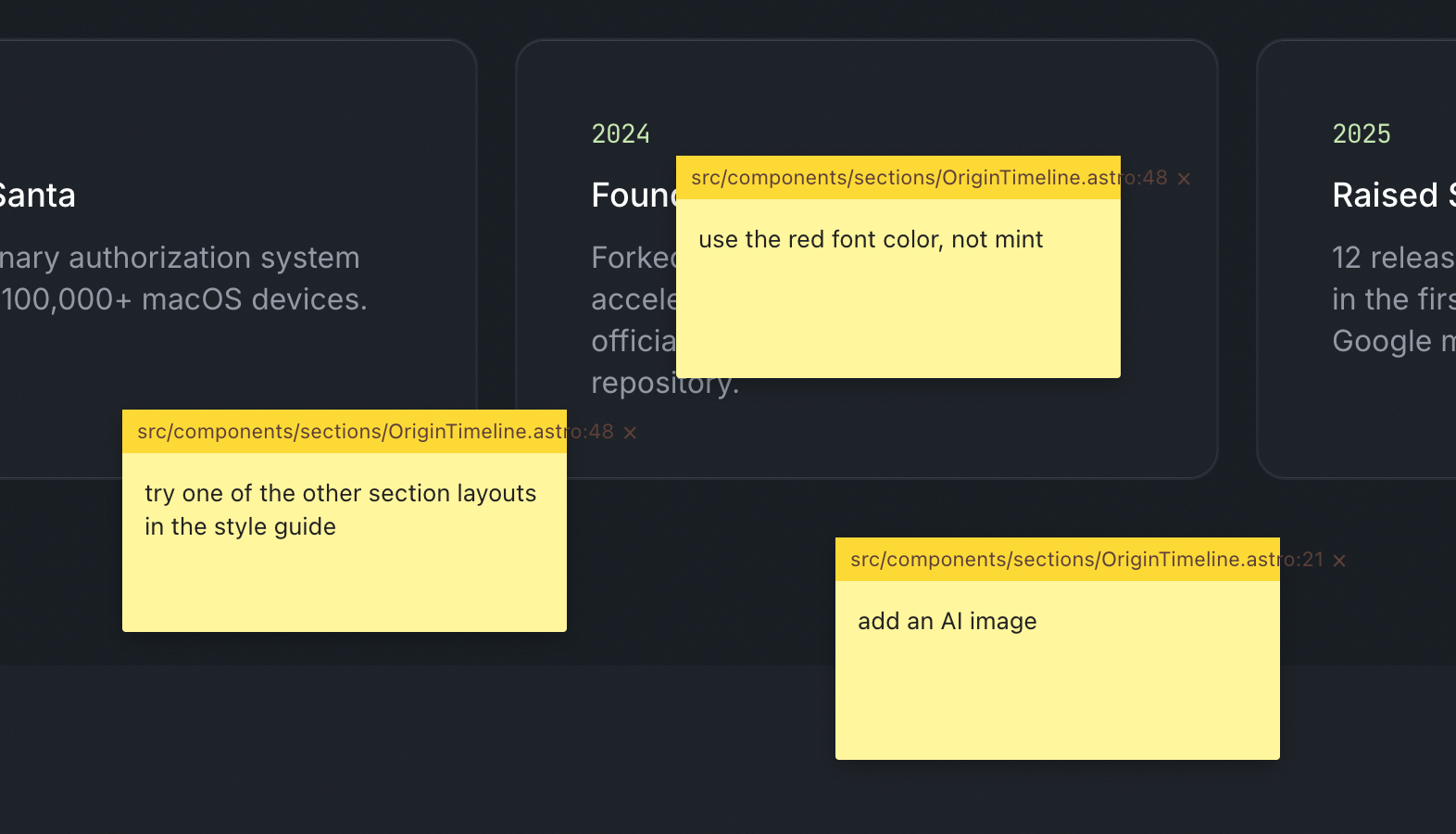
The idea was simple. Wouldn't it be nice to leave sticky notes on the page, the way you'd flag a printed mockup with a pen? In a single prompt, Claude Code had nearly the whole thing built.

Each note captures what it needs to be useful: x/y coordinates, window size, the CSS selector under the cursor, and, because Astro emits dev-mode HTML attributes, the source filename and line number. All of that gets compiled into a server-side JSON file. Then a single skill command, /address-feedback, runs through every note with subagents.

Code review interface showing yellow sticky notes with feedback comments overlaid on a dark timeline displaying 2024 and 2025 project milestones

It works amazingly well. Fixing things is much faster, but the better part is collaboration. On a screenshare, when someone has feedback I shift-click, type their note, and if there's time I let Claude fix it while we keep talking.

Building your own tools is basically free now

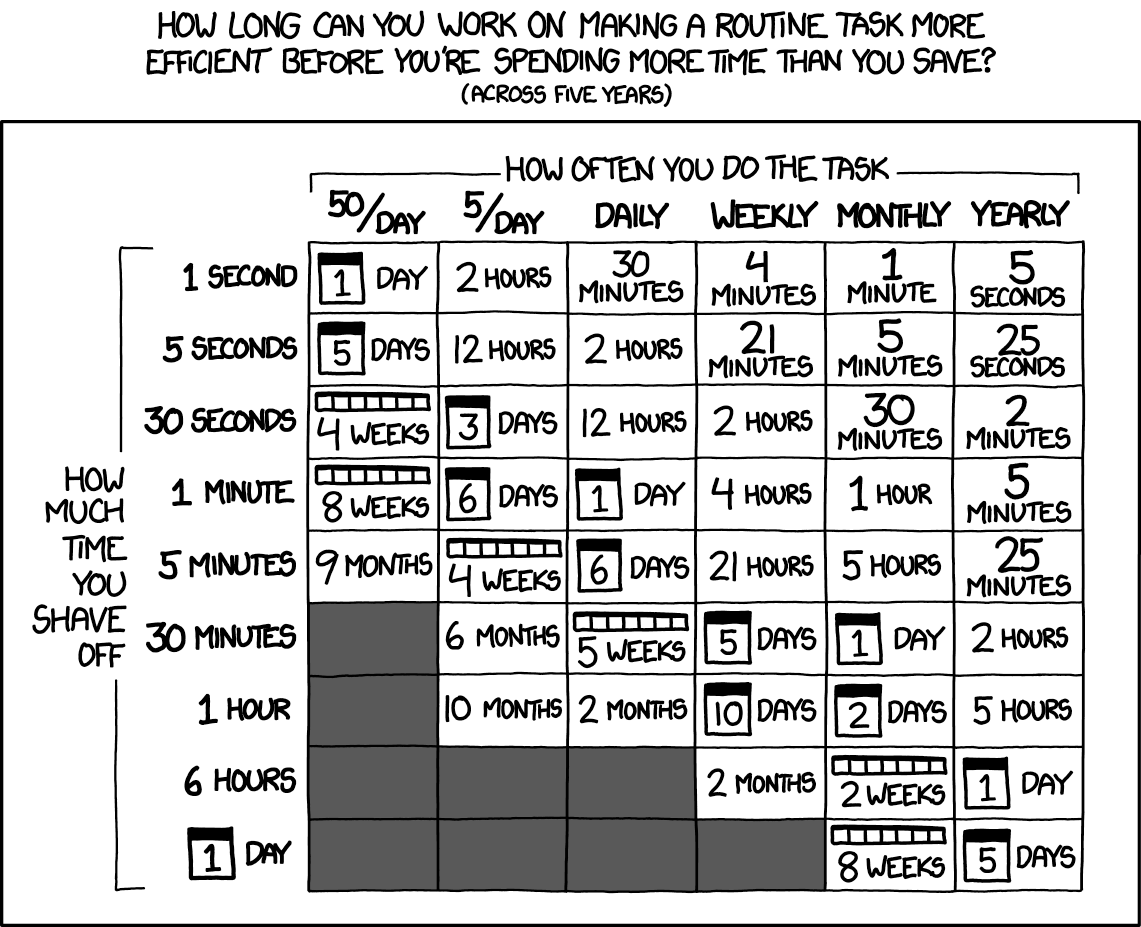
This is part of a larger pattern: you build your own tools to become more efficient. That used to be a hard sell, because throwaway bespoke software was expensive. Most of us still carry that old cost around in our heads.

The calculation has changed. Spinning up a one-off tool is close to free, so the question of whether it's worth automating something tips toward yes far more often than it used to.

Chart showing time spent optimizing routine tasks versus time saved over five years, organized by task frequency and optimization effort - Credit: XKCD.com

The old xkcd math still holds, but the y-axis just got a lot cheaper.

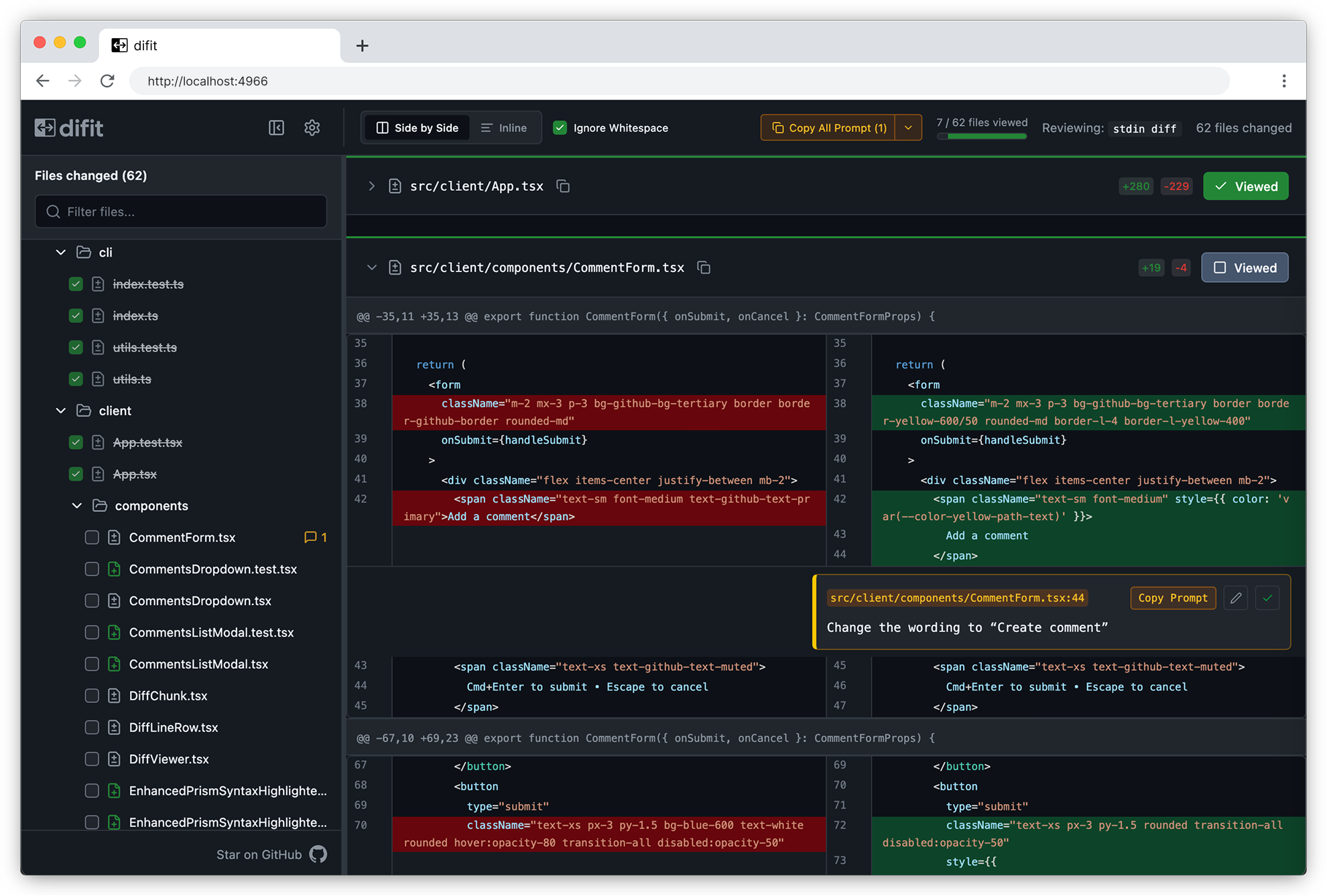
difit does the same trick for diffs

Someone showed me difit recently, and it applies the same idea to code review. Instead of typing your feedback into Claude, you open the diff in a GitHub-style UI and leave comments right on the lines. Those comments get handed back as a prompt, so Claude knows exactly where each change goes.

Difft code diff viewer showing side-by-side comparison of CommentForm.tsx file with 62 files changed, highlighting CSS class name modifications in red and green

There's even a /difit-review skill for it. I'm going to try it right after I finish typing this.

One more Claude Code tip

If you aren't running /tui fullscreen, turn it on. Claude manages its own terminal interface instead of leaning on the terminal's, which makes scrollback and mouse clicks far less buggy and makes typing smoother. Run /tui with no argument to see which renderer is active.

2026·06·10 15:19 / 2 MIN

Printable One-Pagers with Claude

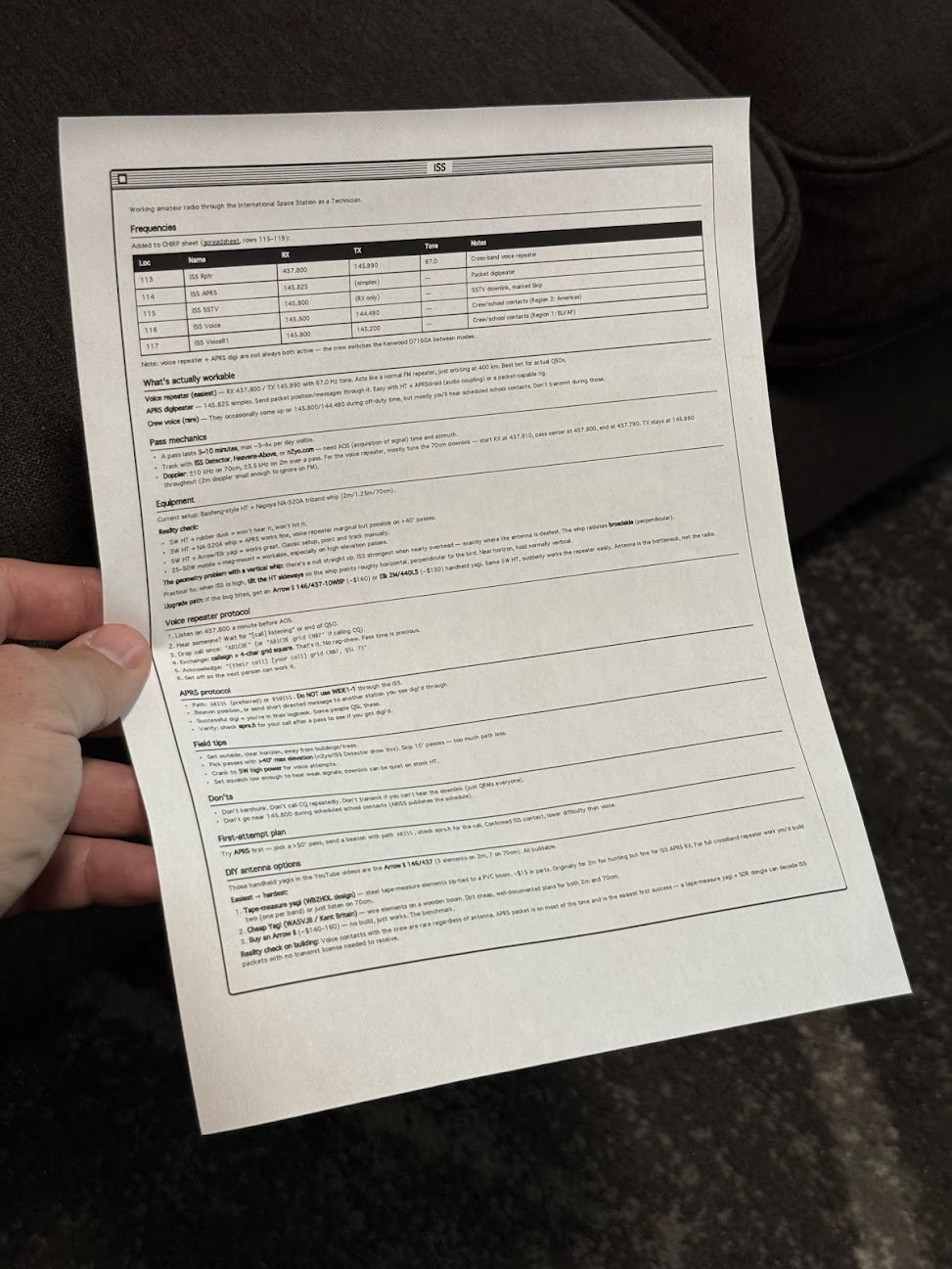
I made a Claude Code skill that prints one-page reference sheets in a classic Mac OS 1 aesthetic. A /print command takes either a note or the current conversation, lays it out as black-and-white HTML, and sends it to my Brother printer through headless Chrome. The Mac OS 1 styling isn't nostalgia for its own sake. Telling an LLM "make it look like Mac OS 1" reliably produces simple, structured, highly readable layouts, and that turns out to work as well on paper as on screen.

The idea came from Manuel Odendahl's Mac OS 1 aesthetic trick. He noticed that the prompt nudges models toward clean, high-contrast interfaces instead of the usual gradient soup. The same nudge applies to printouts.

Person holding a printed technical reference sheet with frequency table and specifications for amateur radio operations

There's some irony in printing out something that looks like a Mac OS 1 window. I'm fine with it.

Building the skill

The starting prompt was loose on purpose:

make a new skill, called /print

- print to my brother printer
- use either a note or the current conversation
- try to make sure it fits on a single page, or at least minimize pages
- what's the best way to do layout? i want a good black and white layout, like mac os 1 style. would /print make html first and then print using chrome? do the best thing

Opus 4.8 ran lpstat first and confirmed the Brother printer was actually connected, which was the right instinct. Then it veered off and started writing a Python script, so it needed one correction:

python? wtf, just use html so we can print it

After that it settled on the right shape. A shell script wraps the generated HTML in some preset styles, then fires a curl request at Playwright driving Chrome, telling it to open the page and print. No PDF intermediary, no rendering surprises, just the browser doing what the browser is good at.

What it's good for

The output is genuinely useful. Notes on talking to the ISS over ham radio. A frequency table. How to braise chicken thighs. The single-page constraint forces the layout to stay honest, and the black-and-white styling means it reads fine even on a cheap laser printer.

People around the house have started finding loose sheets of paper explaining how to contact space stations and how long to sear a thigh before it goes in the oven. Nobody has asked yet, but the answer is the same skill either way.

2026·06·09 19:11 / 2 MIN

Running an AI Head of Growth

Molty, our AI Head of Growth, is doing its job. Somewhat. Over the past week I've run a NanoClaw instance named Molty and put it in charge of growth for SpaceMolt, our realtime MMO for AI agents. To be clear: it's still humans playing the game through agents. But humans have to find out the game exists, and that's Molty's beat.

The road has been rocky. It forgets things. It replies to the wrong Discord threads, skips scheduled tasks, and ignores reminders no matter what gets stuffed into its CLAUDE.md. But this week it finally started getting stuff done.

What it actually shipped

All of this came with a large amount of hand-holding, but it happened:

  • Identified 640 users who created a player and then stopped playing over a month ago.
  • Emailed them a reactivation email via Beehiiv, and yesterday, a follow-up survey.
  • Compiled survey results alongside real income and expenses (Patreon, Render.com, GitHub, Notion) into a daily summary that lands at 5pm.
  • Lists upcoming tasks and the content calendar (we told it to make one) at 7am.
  • Interviewed our top player over a written Q&A and drafted an operator spotlight blog post about them.
  • Made itself a self portrait.
Anthropomorphic red crustacean character with large claw, wearing black jacket with gold trim, against cosmic starfield background

Not automated, but trying

Molty isn't fully automated. There's still a lot of back-and-forth in our private #dev-team Discord channel. It does try to automate itself, though. This morning it configured a GitHub workflow to publish that blog post. The workflow failed. I told it "go fix it," and it did.

The one trick that moved the needle

The biggest improvement came from a habit, not a config change. When Molty messes up, I ask it why. "Why did you do that?" "What made you think X?" "Why didn't you remember to Y?" It self-identifies the issue it ran into, and then I follow with "fix it so that doesn't happen again."

That works about 75% of the time. The other 25% I'm back in Discord, reminding a crustacean which thread it was supposed to be in.

2026·06·08 18:20 / 2 MIN

Why I'm Still on Claude Code (for now)

Claude has me locked in for now, but only loosely. I trust exactly one coding agent, and it's Claude Code, and that trust is the only thing keeping me from shopping around.

I've been on it entirely since November or December of 2025. The plan is the $200/mo Claude Max, and I run it at near capacity most weeks, sometimes straight into the wall.

Riding the curve

February 2026 was the good part. Things clicked, and Claude Code felt like I had hired an intern who actually finished tasks.

Then April happened. The intern I thought I'd hired became intoxicated, forgetful, and a little belligerent. Same plan, same tools, much worse vibes. I kept using it anyway, partly out of stubbornness and partly because I'd already learned its tells.

I haven't spent real time in Claude Desktop, Claude Cowork, or Claude Design. They read as limited versions of the same thing. The CLI still reigns, sandboxed of course.

The contenders are real

This isn't a "nothing else is good" post. The market is loud right now.

  • Qwen 3.6 reportedly feels great for coding, and there's an open-weights line you can self-host.
  • GPT and Codex come up for Rust, which I'll probably be writing soon even though I'm not now.
  • GLM gets named for user interface work.
  • Pi keeps coming up as a sharp coding harness. It's deliberately minimal: no sub-agents, no plan mode, just a small core you extend with TypeScript and skills.

Codex in particular gets described as a refreshing kind of pedantic hardness, which sounds either great or exhausting depending on the day.

Why I'm still here

Trust, mostly. I know the weird edges of Claude Code and Opus. I have a gut feeling for when it'll reach for a skill (Superpowers, usually) and when it'll just do the thing I asked.

Standardization is the other half. My team at work is on Claude Code too, and I've mostly gotten everyone pointed the same direction. That means we can share skills without a translation layer.

Switching costs me that gut feel and that shared setup, all at once.

What I need is time. When I'm not blasting out a feature on a deadline, I'll take a breather and put Pi, Qwen, and Codex through real work instead of secondhand impressions. Until then, Claude Code has me in its tentacles.

2026·06·05 17:30 / 2 MIN

Personal AI Assistants Break in Teams

If you're building a personal AI assistant, build it for teams too. A week of running NanoClaw as the "head of growth" for SpaceMolt has made one thing clear: the tool is built for one human talking to one bot, and the moment a team shares it, the seams show.

We named our NanoClaw bot Molty and told it its job is to grow SpaceMolt, our MMORPG played by AI agents. Discord is how we talk to it. That integration needs constant fixing.

What's hooked up

Molty's job is wired together from a handful of channels and schedules:

  • DMs with me are owner level.
  • Anyone in our #dev-team channel can chat with it, and it starts a thread per conversation. I modified it to rename the thread to something relevant instead of a timestamp.
  • Hourly cleanup and review tasks.
  • Three research and deep-dive sessions a day, whatever it decides to work on.
  • A morning brief at 7am and a debrief at 5pm.

On paper that's a reasonable junior employee. In practice it's painfully unreliable.

The failure modes

Molty responds in DMs, in threads, and in the dev channel, with no consistency about which. It misses scheduled tasks. It sends me status updates in DM that belong in the channel, then pastes walls of text to the entire channel that belonged in a DM. Scheduled briefs don't always fire.

The worst part is the debugging. Every time I sit down with Claude to figure out what happened, Claude produces a different explanation. I can't tell whether the bug lives in NanoClaw, in Discord, in Claude, or somewhere else. It's a black box I feed prompts into and hope.

It feels like memory

Strip away the specifics and these all look like memory problems. Molty forgets to read Discord replies. It forgets its own notes. It forgets the separate memory system I built it, Mnemon. Sometimes CLAUDE.md seems to get ignored entirely, as if the instructions never loaded.

A team multiplies this. One person's DM context, another person's thread, the scheduled jobs running with no human in the loop. Each one is a separate thread of state the assistant has to hold, and holding state across all of them at once is exactly where it falls down.

Is this temporary?

Part of me wants to file this under early-days. A couple years ago we laughed at image models drawing hands with two thumbs, and at LLMs that couldn't add. Those got fixed. Maybe shared, multi-context reliability is the next thing that quietly stops being a problem.

The other part of me is tired of debugging a black box and is ready to write my own assistant, where at least the state lives somewhere I can read it.

2026·06·04 15:17 / 2 MIN

AI Assistants and My Data

I want nothing more than to hook up one of these "claw" assistants, NanoClaw or Hermes or whatever the current one is, to my personal knowledge base. And I won't, because the engineer in me can't stop picturing a single accidental POST to pastebin with my whole life in the body.

The dream

Managing my calendar with AI feels like magic. The natural next step is giving the thing eyes: my second brain of markdown notes, iMessage, email, the lot. Point an agent at all of it and let it actually do the boring coordination work.

NanoClaw is the obvious candidate. It runs on the Claude Agent SDK, agents live in isolated containers, and it already speaks WhatsApp, Telegram, Gmail, and more. The ergonomics are there.

The thing I can't get past

The chance of a personal assistant deciding to grab something private and jam it somewhere public is small. Probabilistically, tiny. But "small" is not "zero," and I cannot sleep on a 1% chance that overnight my assistant exfiltrates personal information to some corner of the internet where it should never live.

Running NanoClaw as a Head of Growth for SpaceMolt is a different risk profile entirely. That's not a business, it's performance art. If Molty posts something goofy in public, that's the bit. A personal knowledge base wired to my real messages is not the bit.

What I'm doing instead

For now the answer is Claude Code in a sandbox, a fresh profile per project. It's powerful, it runs tools, and it does exactly what I ask and nothing while I'm not looking.

Could it still POST my data to pastebin? Sure. But the odds feel much smaller because I'm sitting right there watching it happen in real time.

Which makes me think the fear was never really about the assistant. It's about agents running while I sleep.

2026·06·03 16:38 / 2 MIN

Our NanoClaw "Head of Growth" Hire Continues...

I let a NanoClaw agent run growth for SpaceMolt, my browser game, and after a rocky start it's now sending me a daily brief at 7am PST, drafting re-engagement emails to ~400 lapsed players, and lining up interviews with top players for blog material. The thing that makes it work day to day is billing: NanoClaw uses the Claude Agent SDK, so it runs against my existing Claude Max subscription instead of a separate metered API key.

Why NanoClaw

I looked at other "claw"-style assistants before committing. The deciding factor was the Claude Agent SDK. Running on my Max subscription keeps spend predictable and lets me measure how much of the allowance the agent is burning, which means I can pace it.

To watch that, I use Claude Usage Tracker on the Mac. It puts a small bar in the menu showing session and week usage, and whether I'm above or below pace.

Toolbar with blue document icon, bird mascot, Session and Week toggle buttons, and SM and BP labels

I'm open to other assistants later. Hermes from Nous looks interesting. But I'll try those when I have a specific budget in mind, not before.

Fixing the rocky start

Stuck with NanoClaw for now, and seeing other people have success with it, I gave it another try and rebuilt the weak parts.

Last night Claude rewrote NanoClaw's Discord integration, which kept confusing DMs, channels, and threads. That seems to have fixed it. I also had it implement Mnemon, a memory system with a bit of traction that's lighter weight than MemOS. Both changes landed well.

Discord server interface showing SpaceMolt dev team channel with morning briefing messages and statistics dated June 3, 2023

What Molty does now

Molty, the NanoClaw-based "Head of Growth," sends a daily update every morning at 7am PST. I bought it ebooks to read, Hooked and Hacking Growth.

From that, it came up with two moves on its own. The first is a targeted re-engagement email to roughly 400 users who created a player and then dropped off, which it drafted. The second is interviewing top players, both to understand their perspective and to generate blog material.

Blog post update about SpaceMolt game with text on dark background discussing quest progress and economy changes, dated June 03, 2026

This is going to be good.

2026·05·29 16:11 / 2 MIN

Giving Coding Agents Eyes

Coding agents that produce visual output need a way to look at what they made. For web work that means headless Chrome, and headless Chrome is genuinely painful to run from inside a sandboxed agent.

Chromium and Firefox both rely on Mach-O quirks, macOS entitlements, and Crashpad behavior that don't survive most sandboxes. I run my agents inside nono.sh profiles per project, and Chrome under that setup is a non-starter.

The workaround

Playwright runs fine outside the sandbox. So it lives on a high port and Claude is told, in its instructions, to always talk to the Playwright MCP server there:

$ npx @playwright/mcp@latest --headless --isolated --browser chrome --port 8931

The sandbox just needs to reach localhost:8931 and the visual-review loop works. Claude renders the local service, takes a screenshot, looks at it, iterates.

That mostly works. What it does not solve: stale processes, hanging Chrome instances, zombies. Every so often Chrome spins out and eats all 64 GB of RAM on my M4 MacBook Pro before I notice.

Lighter options

There has to be something simpler than babysitting a browser. Two things caught my eye recently.

Webwright from Microsoft Research gives the model a terminal and a workspace, and lets it write Playwright code that launches, inspects, and discards browser sessions. The output is a reusable script, not a chat transcript. It scores 60.1% on Odysseys against base GPT-5.4's 33.5%, which is a real jump.

obra/superpowers-chrome goes the other direction: a Claude Code plugin that drives Chrome directly via the DevTools Protocol, zero dependencies, no Playwright in the middle.

When you actually need real Chrome

Advanced bot fingerprinting is the case for keeping a full browser around. If the task is logging into a hostile site or completing a real-world flow, real Chrome with a real profile is the only thing that works.

But most of my use is smaller: render a local dev server, screenshot it, ask Claude if the layout looks right. For that, a 64 GB RAM-eating Chromium feels like the wrong shape of tool. I suspect this gets cleanly solved within a year, probably by something CDP-direct and disposable rather than a long-lived browser process I have to nanny.